Okay thanks, I’ll see if I can defined or pass a fixed size along with the images, else I’ll try to calculate them!
@Dominic.Lerbs If you have a simple example of the “not within a transaction” happening upon image loading, I’d like to see it also. I tried a few scenarios but didn’t get that issue, so I must be missing something.
It might also be worth it to see if it still happens when using the GoJS beta version:
https://gojs.net/beta/release/go-debug.js
@simon I don’t have a simple example right now, I’ll try to one when I find some time.
Hello @simon ,
I was now able to reproduce this issue with a simple example: https://filebin.net/k0hyjgcshxgk81yd/sample.html
Note: In Chrome DevTools, also choose “Disable Cache” and a throttled internet connection:
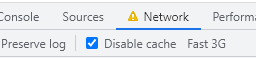
Basically it has a go.Picture with an svg as image source:
$(go.Picture,
      {
        desiredSize: new go.Size(580, 580)
      },
      new go.Binding("source", "text", () => "https://gojs.net/latest/intro/images/tiger.svg"),
When the image is loaded initially and the connection is rather slow, this shows a warning in the console:
Change not within a transaction: !d points: Link#8520([object Object])  old: List()#8528  new: List()#8781
go-debug.js:14 Change not within a transaction: !d position: Link#8520([object Object])  old: Point(407.5011315681186,-594.8070320675477)  new: Point(407.5011315681186,-508.28953521159974)
If I remove the desiredSize, I get even more warnings:
Change not within a transaction: !d position: 1  old: Point(0,0)  new: Point(-264.55517578125,-276.41962890624995)
go-debug.js:14 Change not within a transaction: !d position: 2  old: Point(77.41249593580794,0)  new: Point(-191.41514078294205,-276.41962890624995)
go-debug.js:14 Change not within a transaction: !d position: 3  old: Point(11.5,102.07529296875)  new: Point(-246.82080078124997,-174.34433593749998)
go-debug.js:14 Change not within a transaction: !d position: 4  old: Point(101.38124593580794,102.07529296875)  new: Point(-165.50156656419205,-174.34433593749998)
go-debug.js:14 Change not within a transaction: !d points: Link#613([object Object])  old: List()#744  new: List()#856
go-debug.js:14 Change not within a transaction: !d position: Link#613([object Object])  old: Point(80.38124593580794,114.41708781165397)  new: Point(44.44062296790398,113.91708781165397)
go-debug.js:14 Change not within a transaction: !d location: 5  old: Point(11.5,102.07529296875)  new: Point(-246.82080078124997,-174.34433593749998)
go-debug.js:14 Change not within a transaction: !d position: 5  old: Point(0,70)  new: Point(-258.32080078125,-206.41962890624998)
go-debug.js:14 Change not within a transaction: !d points: Link#597([object Object])  old: List()#747  new: List()#859
go-debug.js:14 Change not within a transaction: !d position: Link#597([object Object])  old: Point(56.41249593580794,12.341794842903965)  new: Point(-265.55517578125,11.847935642432256)
go-debug.js:14 Change not within a transaction: !d points: Link#624([object Object])  old: List()#746  new: List()#860
go-debug.js:14 Change not within a transaction: !d position: Link#624([object Object])  old: Point(27.90131127026823,32.67621009791596)  new: Point(-25.972891414058815,-277.41224931835796)
go-debug.js:14 Change not within a transaction: !d points: Link#606([object Object])  old: List()#748  new: List()#861
go-debug.js:14 Change not within a transaction: !d position: Link#606([object Object])  old: Point(85.41134331461967,32.61660238770015)  new: Point(-74.17960384370016,309.0362312939502)
Assinging a fixed width and height to the node solves the issues. However, as mentioned in a post earlier, this would be a bit difficult for us.
So it would be great if you have any advice or fix how to solve this without providing width/height…
I’m not sure that there is a solution – it’s just warning you that the Picture and thus the Node and thus Links connected with that Node are changing after the image is loaded.
Not only a warning, there is also an undesired entry in the undoManager (if desiredSize is not set)…
I suggest that you preload all images, before using the data in a diagram model.