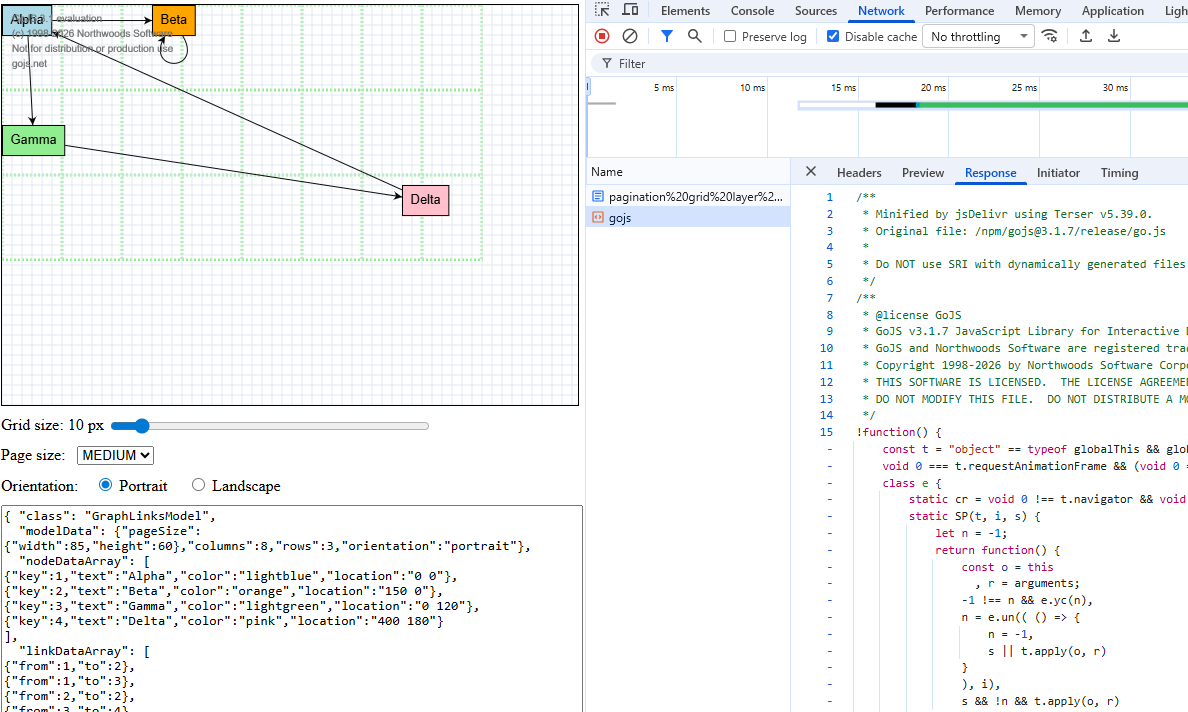
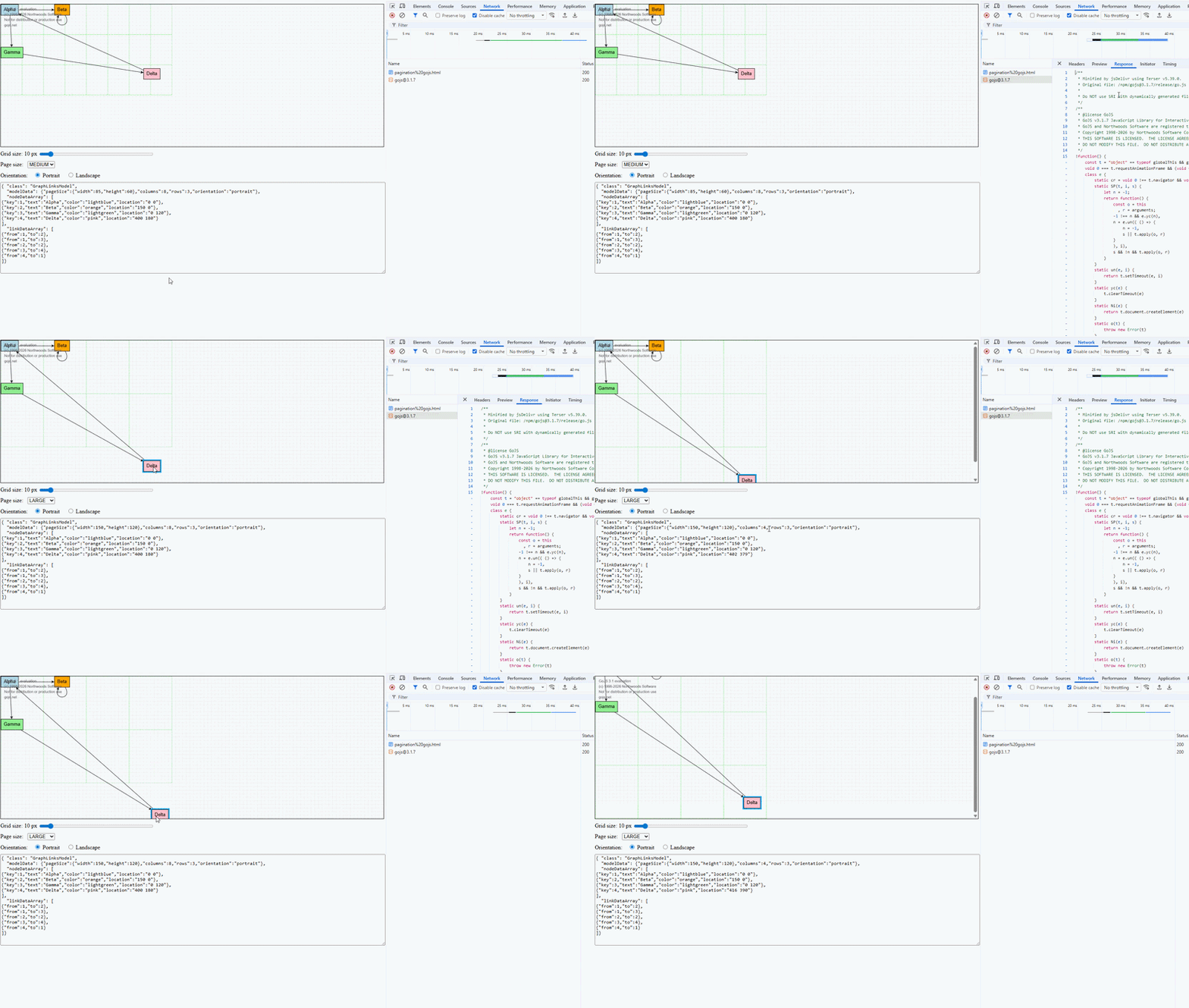
I created an example that shows how our “paginationGrid” is implemented at the moment.
The standard grid template is overriden for styling but does not use any bindings. We are just setting the diagram.grid.gridCellSize to modify the size.
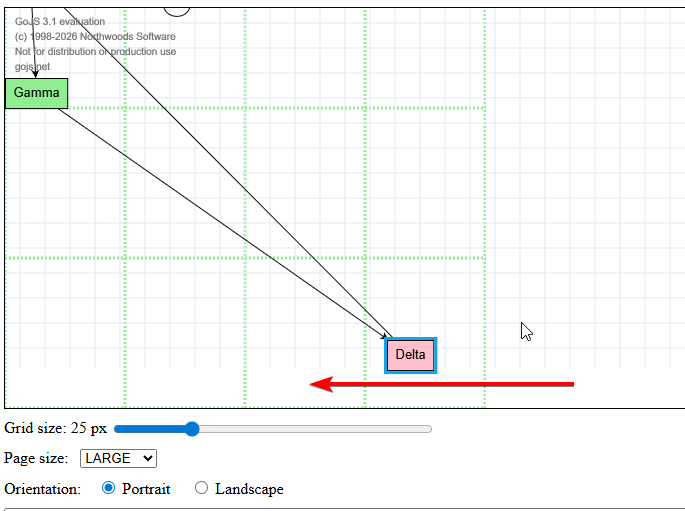
The pagination grid is a node on a temporary layer. The data of that node is set to the diagram modelData and binds an empty ‘’ binding (if anything of the model changes) in order to notice rows/columns being changed to reflect that via interval on the shape. The node is also only as big as the dimensions require it. We want to (at least partially) circumvent having scroll bars, even if you dont need them, but as you can see it is not an ideal solution. You can test that by dragging a node to the right or bottom.
The standard grid and paginationGrid work completely independent in this implementation.
With this implementation we do not have this performance issue but it is complicated, split and cumbersome to maintain. Thats why I prefer the solution of our previous example.
Also another bug, if you set the page size to LARGE and drag a node to the bottom of the canvas, so that the canvas gets scroll bars, and then scroll down, the standard grid is not being rendered and a white blank instead.
<!doctype html>
<html lang="en">
  <head>
    <meta charset="UTF-8" />
    <title>GoJS Pagination Grid Example</title>
  </head>
  <body>
    <div
      id="myDiagramDiv"
      style="border: solid 1px black; width: 100%; height: 400px"
    ></div>

    <div style="margin: 10px 0">
      <label>
        Grid size:
        <span id="gridCellSizeValue">10</span> px
        <input
          id="gridCellSizeSlider"
          type="range"
          min="2"
          max="100"
          step="1"
          value="10"
          style="width: 320px; vertical-align: middle"
        />
      </label>
    </div>

    <div style="margin: 10px 0">
      <label for="pageSizeSelect">
        Page size:
        <select id="pageSizeSelect" style="margin-left: 8px">
          <option value="SMALL">SMALL</option>
          <option value="MEDIUM" selected>MEDIUM</option>
          <option value="LARGE">LARGE</option>
        </select>
      </label>
    </div>

    <div style="margin: 10px 0">
      <span style="margin-right: 12px">Orientation:</span>

      <label style="margin-right: 16px">
        <input
          type="radio"
          name="orientation"
          value="portrait"
          id="orientationPortrait"
          checked
        />
        Portrait
      </label>

      <label>
        <input
          type="radio"
          name="orientation"
          value="landscape"
          id="orientationLandscape"
        />
        Landscape
      </label>
    </div>

    <textarea id="mySavedModel" style="width: 100%; height: 250px"></textarea>

    <script src="https://cdn.jsdelivr.net/npm/[email protected]"></script>
    <script>
      class PaginationDiagram extends go.Diagram {
        computeBounds(rect) {
          const bounds = super.computeBounds(rect);
          const modelData = this.model.modelData;
          const pageSize = getCanvasPageSize(modelData);

          const columns = Math.ceil(bounds.right / pageSize.width) || 1;
          const rows = Math.ceil(bounds.bottom / pageSize.height) || 1;

          if (modelData.columns !== columns) {
            this.model.set(modelData, "columns", columns);
          }
          if (modelData.rows !== rows) {
            this.model.set(modelData, "rows", rows);
          }

          bounds.x = 0;
          bounds.y = 0;
          bounds.width = columns * pageSize.width;
          bounds.height = rows * pageSize.height;
          return bounds;
        }
      }

      const myDiagram = new PaginationDiagram("myDiagramDiv", {
        "undoManager.isEnabled": true,
        "grid.visible": true,
		"initialContentAlignment": go.Spot.TopLeft,
        "contentAlignment": go.Spot.TopLeft,
        grid: new go.Panel(go.Panel.Grid, {
          gridCellSize: new go.Size(10, 10),
        }).add(
          new go.Shape("LineH", { stroke: "#e2e8f0", strokeWidth: 1 }),
          new go.Shape("LineV", { stroke: "#e2e8f0", strokeWidth: 1 }),
        ),
        ModelChanged: (e) => {
          if (e.isTransactionFinished) {
            document.getElementById("mySavedModel").textContent =
              e.model.toJson();
          }
        },
      });

      myDiagram.nodeTemplate = new go.Node("Auto", {
        locationSpot: go.Spot.TopLeft,
      })
        .bindTwoWay("location", "location", go.Point.parse, go.Point.stringify)
        .add(
          new go.Shape({ fill: "white" }).bind("fill", "color"),
          new go.TextBlock({ margin: 8 }).bind("text"),
        );

      myDiagram.model = new go.GraphLinksModel({
        modelData: {
          pageSize: { width: 85, height: 60 },
          columns: 1,
          rows: 1,
          orientation: "portrait",
        },
        nodeDataArray: [
          { key: 1, text: "Alpha", color: "lightblue", location: "0 0" },
          { key: 2, text: "Beta", color: "orange", location: "150 0" },
          { key: 3, text: "Gamma", color: "lightgreen", location: "0 120" },
          { key: 4, text: "Delta", color: "pink", location: "400 180" },
        ],
        linkDataArray: [
          { from: 1, to: 2 },
          { from: 1, to: 3 },
          { from: 2, to: 2 },
          { from: 3, to: 4 },
          { from: 4, to: 1 },
        ],
      });

      function getCanvasPageSize(viewOptions) {
        const pageSize = viewOptions.pageSize;
        const orientation = viewOptions.orientation ?? "portrait";

        if (orientation === "landscape") {
          console.log(orientation);
          return {
            width: Math.max(pageSize.width, pageSize.height),
            height: Math.min(pageSize.width, pageSize.height),
          };
        }

        return {
          width: Math.min(pageSize.width, pageSize.height),
          height: Math.max(pageSize.width, pageSize.height),
        };
      }

      function createPaginationGridTemplate() {
        const $ = go.GraphObject.make;

        const computeDimension = (dim) => (_, targetObj) => {
          const data = targetObj.part.data;
          const pageSize = getCanvasPageSize(data);
          return (
            pageSize[dim] * (dim === "width" ? data.columns : data.rows) + 1
          );
        };

        const computeInterval = (dim) => (_, targetObj) => {
          const data = targetObj.part.data;
          return getCanvasPageSize(data)[dim];
        };

        return $(
          go.Node,
          "Auto",
          {
            layerName: "PaginationGrid",
            location: new go.Point(0, 0),
            selectable: false,
            pickable: false,
          },
          new go.Binding("height", "", computeDimension("height")),
          new go.Binding("width", "", computeDimension("width")),
          $(
            go.Panel,
            go.Panel.Grid,
            { gridCellSize: new go.Size(1, 1) },
            $(
              go.Shape,
              "LineH",
              { stroke: "lightgreen", strokeDashArray: [2, 2], strokeWidth: 3 },
              new go.Binding("interval", "", computeInterval("height")),
            ),
            $(
              go.Shape,
              "LineV",
              { stroke: "lightgreen", strokeDashArray: [2, 2], strokeWidth: 3 },
              new go.Binding("interval", "", computeInterval("width")),
            ),
          ),
        );
      }

      const paginationGridLayer = new go.Layer({
        name: "PaginationGrid",
        isTemporary: true,
        isInDocumentBounds: false,
        allowSelect: false,
      });

      const gridLayer = myDiagram.findLayer("Grid");
      myDiagram.addLayerBefore(paginationGridLayer, gridLayer);

      const paginationGrid = createPaginationGridTemplate();
      paginationGrid.data = myDiagram.model.modelData;
      myDiagram.add(paginationGrid);

      function refreshPaginationGrid() {
        paginationGrid.updateTargetBindings();
      }

      function registerViewOptionsChangedHandler() {
        myDiagram.addModelChangedListener((e) => {
          if (!e.isTransactionFinished) {
            return;
          }

          const transaction = e.object;
          if (!(transaction instanceof go.Transaction)) {
            return;
          }

          if (transaction.name === "Initial Layout") {
            return;
          }

          const hasRelevantChange = transaction.changes.any((change) => {
            if (change.change !== go.ChangeType.Property) {
              return false;
            }

            const propertyName = String(change.propertyName).toLowerCase();
            return (
              propertyName === "rows" ||
              propertyName === "columns" ||
              propertyName === "pagesize" ||
              propertyName === "orientation"
            );
          });

          if (hasRelevantChange) {
            myDiagram.invalidateDocumentBounds();
          }
        });
      }

      myDiagram.addDiagramListener("DocumentBoundsChanged", () => {
        refreshPaginationGrid();
      });

      registerViewOptionsChangedHandler();

      const gridCellSizeValue = document.getElementById("gridCellSizeValue");
      const gridCellSizeSlider = document.getElementById("gridCellSizeSlider");

      gridCellSizeSlider.addEventListener("input", (e) => {
        setGridCellSize(e.target.value);
      });

      function setGridCellSize(px) {
        const value = Math.round(Math.max(2, Number(px)));
        gridCellSizeValue.textContent = String(value);
        myDiagram.grid.gridCellSize = new go.Size(value, value);
      }

      const PAGE_SIZES = {
        SMALL: { width: 50, height: 35 },
        MEDIUM: { width: 85, height: 60 },
        LARGE: { width: 150, height: 120 },
      };

      const pageSizeSelect = document.getElementById("pageSizeSelect");

      pageSizeSelect.addEventListener("change", (e) => {
        setPageSizePreset(e.target.value);
      });

      function setPageSizePreset(name) {
        const pageSize = PAGE_SIZES[name];
        if (!pageSize) {
          return;
        }

        myDiagram.model.commit((m) => {
          m.set(m.modelData, "pageSize", {
            width: pageSize.width,
            height: pageSize.height,
          });
        }, "SetPageSize");
      }

      function syncPageSizeControl() {
        const current = myDiagram.model.modelData.pageSize;

        const match = Object.entries(PAGE_SIZES).find(([, size]) => {
          return size.width === current.width && size.height === current.height;
        });

        if (match) {
          pageSizeSelect.value = match[0];
        }
      }

      const orientationPortrait = document.getElementById(
        "orientationPortrait",
      );
      const orientationLandscape = document.getElementById(
        "orientationLandscape",
      );

      orientationPortrait.addEventListener("change", (e) => {
        if (e.target.checked) {
          setOrientation("portrait");
        }
      });

      orientationLandscape.addEventListener("change", (e) => {
        if (e.target.checked) {
          setOrientation("landscape");
        }
      });

      function setOrientation(orientation) {
        myDiagram.model.commit((m) => {
          m.set(m.modelData, "orientation", orientation);
        }, "SetPageOrientation");
      }

      function syncOrientationControls() {
        const orientation = myDiagram.model.modelData.orientation ?? "portrait";
        orientationPortrait.checked = orientation === "portrait";
        orientationLandscape.checked = orientation === "landscape";
      }

      syncOrientationControls();
      syncPageSizeControl();
      setGridCellSize(10);
    </script>
  </body>
</html>