That Tree Map sample uses absolutely the simplest kind of node, as you can see by the template:
    // Nodes and Groups are the absolute minimum template: no elements at all!
    myDiagram.nodeTemplate =
      $(go.Node,
        { background: "rgba(99,99,99,0.2)" },
        new go.Binding("background", "fill"),
        {
          toolTip: $("ToolTip",
            $(go.TextBlock, new go.Binding("text", "", tooltipString).ofObject())
          )
        }
      );
Although the tooltip helps let people see some text for each colored rectangle.
The first thing to try is to just add a TextBlock to the node template:
    myDiagram.nodeTemplate =
      $(go.Node,
        { background: "rgba(99,99,99,0.2)" },
        new go.Binding("background", "fill"),
        $(go.TextBlock,
          new go.Binding("text")),
        {
          toolTip: $("ToolTip",
            $(go.TextBlock, new go.Binding("text", "", tooltipString).ofObject())
          )
        }
      );
You can see that when TreeMapLayout.layoutNode sets the node’s desiredSize, it causes the text of the TextBlock to maybe wrap and maybe be clipped, depending on the given width and height.
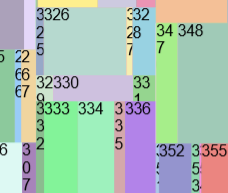
You can then change the Node’s Panel type to be “Auto”, so that it aligns the TextBlock in the middle (by default) and also forces the text to wrap and clip:
      $(go.Node, "Auto",
        $(go.Shape, { fill: "rgba(99,99,99,0.2)", strokeWidth: 0 },
          new go.Binding("fill")),
        $(go.TextBlock,
          new go.Binding("text")),
        {
          toolTip: $("ToolTip",
            $(go.TextBlock, new go.Binding("text", "", tooltipString).ofObject())
          )
        }
      )
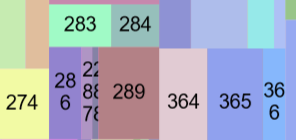
Read more about TextBlocks and Panels and Nodes at:
https://gojs.net/latest/intro/textBlocks.html
https://gojs.net/latest/intro/panels.html
https://gojs.net/latest/intro/nodes.html