Thank you, I think I am getting closer. I have two issues now. First, the sorted array doesn’t bring the ports with it so it ruins the linking between field to field. Second, can I bind the row number of go.RowColumnDefinition? It doesn’t appear I can. I currently have the following:
// sets the fields row
$(go.Panel, "Table",
	new go.Binding("itemArray", "fields", function(fields) {
		function countInArray(array, key, value) {
			var count = 0;
			for (var i = 0; i < array.length; i++) {
				if (array[i][key] === value) {
					count++;
				}
			}
			return count;
		}
		rowNum = countInArray(fields, "isUnderline", true);
		fields = fields.sort(function (a, b) { return b.isUnderline - a.isUnderline; } );
		return fields;
	}).makeTwoWay(),
	{
		name: "FIELDS",
		row: 1,
		minSize: new go.Size(100, 10),
		stretch: go.GraphObject.Horizontal,
		defaultAlignment: go.Spot.Left,
		defaultColumnSeparatorStroke: "#3c599b",
		cursor: "pointer",
		itemTemplateMap: itemTemplateMap
	},
	$(go.RowColumnDefinition, { row: 0, separatorStroke: "#3c599b" },
		new go.Binding("row", "row", function() {return rowNum;})
	)
)
Ultimately, this is what I want to end up with:
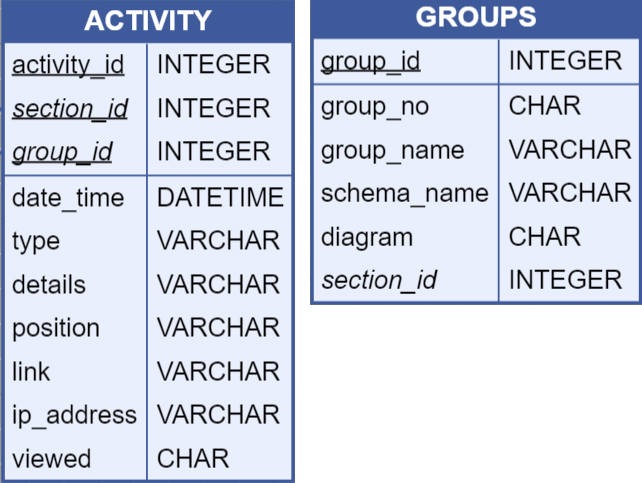
Essentially, I want all the underlined fields to show up at the top with a line after the last underlined field