Adornment rotates when node rotates

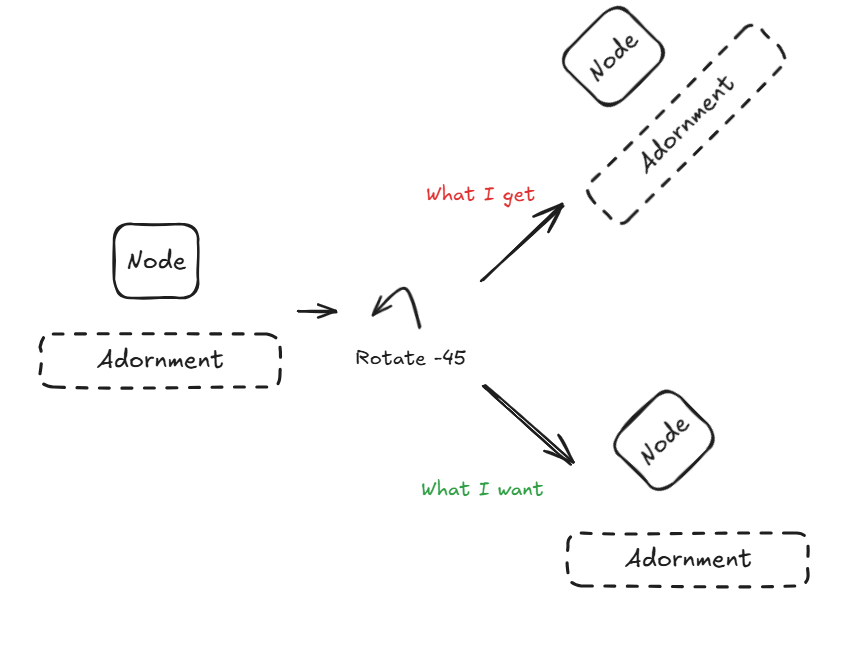
I have an adornment attached to a node. When I rotate this node by changing its angle value, both the node and its adornment gets rotated too. This makes reading any texts inside the adornment or interacting with buttons inside the adornment very inconvenient.


Is there a way to do this while still using adornments or would I have to manually attach a new node to act as an adornment?

How have you defined your Adornment?

Here’s an example. Basically I have wrapped whatever you have defined as the node template in a simple “Position” Panel that is the new Node. (“Position” is the default type of Panel.) But the user rotates the contents of that Node Panel – which is whatever you had defined as the whole Node before.

<!DOCTYPE html>
<html>
<head>
  <title>Minimal GoJS Sample</title>
  <!-- Copyright 1998-2025 by Northwoods Software Corporation. -->
</head>
<body>
  <div id="myDiagramDiv" style="border: solid 1px black; width:100%; height:400px"></div>
  <textarea id="mySavedModel" style="width:100%;height:250px"></textarea>

  <script src="https://cdn.jsdelivr.net/npm/gojs/release/go-debug.js"></script>
  <script id="code">
const myDiagram =
  new go.Diagram("myDiagramDiv", {
      "undoManager.isEnabled": true,
      "ModelChanged": e => {     // just for demonstration purposes,
        if (e.isTransactionFinished) {  // show the model data in the page's TextArea
          document.getElementById("mySavedModel").textContent = e.model.toJson();
        }
      }
    });

myDiagram.nodeTemplate =
  new go.Node({
      locationSpot: go.Spot.Center,
      rotatable: true, rotateObjectName: "ROT", rotationSpot: go.Spot.Center
    })
    .bindTwoWay("location", "loc", go.Point.parse, go.Point.stringify)
    .add(
      // the details of this Panel don't matter, just that it's named by the rotateObjectName
      new go.Panel("Auto", { name: "ROT" })
        .bindTwoWay("angle")
        .add(
          new go.Shape({ fill: "white" })
            .bind("fill", "color"),
          new go.TextBlock({ margin: 8 })
            .bind("text")
        )
    );

myDiagram.nodeTemplate.selectionAdornmentTemplate =
  new go.Adornment("Vertical")
    .add(
      new go.Placeholder(),
      new go.TextBlock()
        .bind("text", "color")
    )

myDiagram.model = new go.GraphLinksModel(
[
  { key: 1, text: "Alpha", color: "lightblue" },
  { key: 2, text: "Beta", color: "orange" },
  { key: 3, text: "Gamma", color: "lightgreen" },
  { key: 4, text: "Delta", color: "pink", angle: -45 }
],
[
  { from: 1, to: 2 },
  { from: 1, to: 3 },
  { from: 2, to: 2 },
  { from: 3, to: 4 },
  { from: 4, to: 1 }
]);
  </script>
</body>
</html>
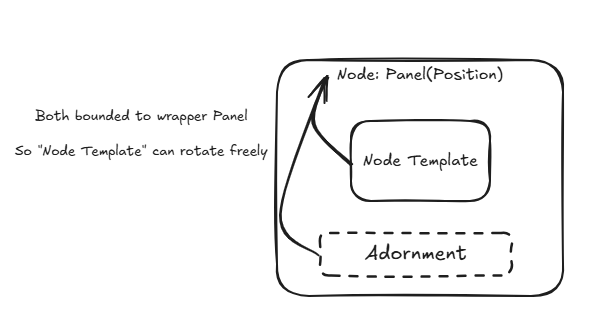
Adornment is created in a separate file and added into node using something like

myNode.selectionAdornmentTemplate = createAdornmentTemplate(GraphObject.make)

There doesn’t seem to be any issues with adding adornment as it’s done similarly to your example, but I’m encountering some problems with myNode

  1. I’ve tried declaring new go.Node({ rotateObjectName : 'ROT',... }) like you did but apparently none of the properties that was used exist in PanelLayout type? I am able to add these properties in later using iconNode.add(…) it seems

  2. The way myNode is currently implemented, all of the binding and properties are defined within the myNode (including ports) instead of being separated into a wrapper and the node panel itself. This is the code we use for our iconNode with some details omitted

function makeIconNode() {
  const iconNode = new Node(Panel.Vertical)
  iconNode.locationSpot = Spot.Center
  iconNode.locationObjectName = 'icon'
  iconNode.selectionObjectName = 'icon' // use for SVG
  iconNode.selectable = true
  iconNode.selectionAdorned = false

  iconNode.bind(new Binding('cursor', 'storeData').ofModel())

  iconNode.background = 'transparent'
  iconNode.movable = !readonly
  iconNode.deletable = !readonly

  iconNode.bind(
    new Binding('location', 'location', ({ x, y }) => {
      return new Point(x, y)
    })
  );
  iconNode.bind(new Binding('layerName', 'layerName'))
  iconNode.bind(new Binding('angle', 'angle'))
  iconNode.selectionChanged = (part: Part) => { /* Selection Stuff */ }

  iconNode.mouseEnter = (some function)
  iconNode.mouseLeave = (some function)

  iconNode.add(/* some ports */)

  return iconNode;
}

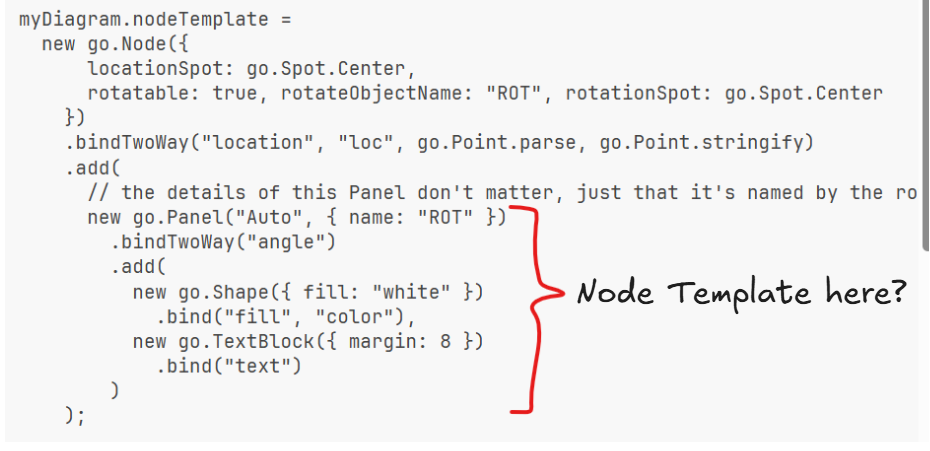
If I’m understanding you correctly, conceptually this is what you’re suggesting

I’ve tried to move whatever properties and bindings I can into a separate Panel called iconPanel, naming the Panel ‘ROT’, then add the Panel into iconNode. I’ve also added rotateObjectName: 'ROT'and the related properties you’ve shown into iconNode but, evidently, I’m not entirely sure which properties/bindings should be assigned to which.

Yes, all Part and Node properties that you set or bind must remain on the Node and cannot move down to the nested Panel.

I’ll update the sample to demonstrate how the location and locationSpot properties remain on the Node (actually those properties are defined on the Part class).

BTW, if you are using a recent version of GoJS, you can replace:

obj.bind(new Binding(. . .))

with one of these two:

obj.bind(. . .)
obj.bindTwoWay(. . .)

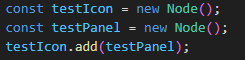
I’ve tried wrapping my existing node template (type Node) inside of a Panel that’s inside of the Node containing rotation properties, something like this

const testNode = new Node() // testNode.rotateObjectName = ... elsewhere
const testWrapper = new Panel()
...

testWrapper.add(testNode)

But I keep getting this error

image

Which is a little confusing for me as I’ve read that Part inherits from Panel and is lower on the Hierarchy. Also apologies for any confusion beforehand as the code I’m dealing with is made sometimes ago and still uses the old version/syntaxes of GoJS and I’m just still learning GoJS in general.

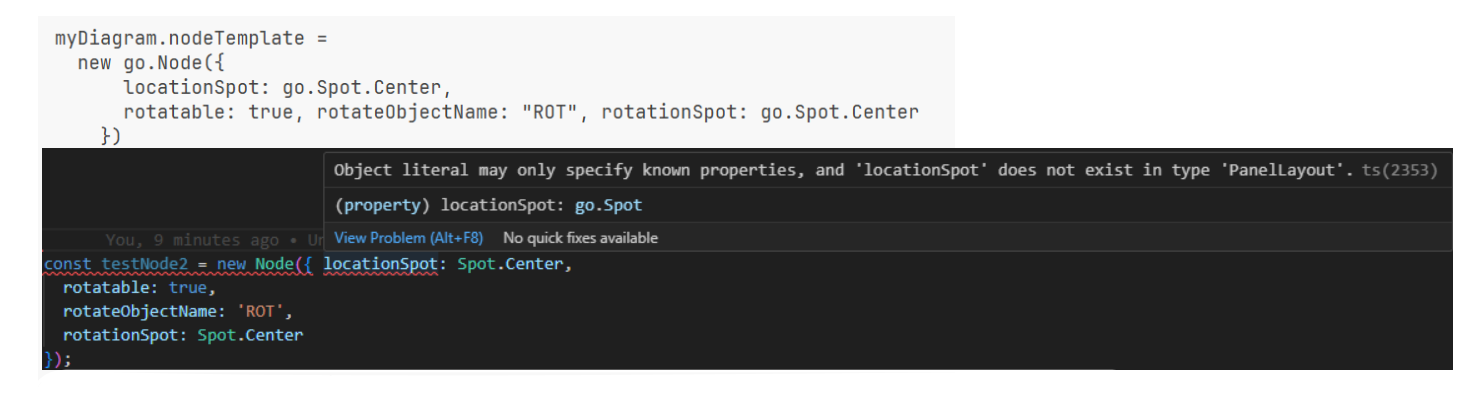
I also get this type error when I try to declare the locationSpot and its related properties when creating a new Node

I can do this later, however

testIcon.locationSpot = ...

Just for fun I’ve also tried this to see if I might just be able nest my node template inside another Node but doesn’t seem like that works…

image

“Cannot add Part to Panel” error (wasn’t able to add in 4th picture to post)

Thank you so much for your help so far!

// before:

Node, "Auto", node settings, "Auto" panel settings,
    node bindings, "Auto" panel bindings
    Shape
    TextBlock
// after:

Node, node settings,
    node bindings
    Panel, "Auto", "Auto" panel settings,
        "Auto" panel bindings
        Shape
        TextBlock

Sorry, I am still very confused with your suggestions. Maybe we’re using an older version of GoJS (2.1 it seems) so bindTwoWay didn’t even pop up for me (don’t know if it exists in v2 but nevertheless it just doesn’t show up in autofill).

Even just trying to add my nodeTemplate inside this Panel is giving me the “Cannot add Part into Panel, try Panel instead” error, but as I understand Node is of type Panel by default?

Apologies for the confusion

Yes, GraphObject.bindTwoWay was added in 3.0 although it exists undocumented in later versions of 2.3.

And constructor initializers were added in 3.0. All of our code samples and examples now make use of these new features (well, new a couple years ago).

And those error messages are correct: one cannot add a Part (such as a Node) to a Panel. But one can add a Panel to a Panel.

Ah that is unfortunate. We will be making the migration to version 3 eventually but not right now. Would you mind me asking, then, how I would be able to “add” the desired node template (assuming I’ve changed it to Panel I suppose) within this ROT panel? I’m not entirely sure where to find more documentation or examples using v2 so this is what I’m able to make up using other examples in our codebase.

  const $ = GraphObject.make;
  const testNode = $(
    Node,
    'Auto',
    { locationSpot: Spot.Center, rotateObjectName: 'ROT', rotationSpot: Spot.Center },
    new Binding('location', 'location', target => {
      return '';
    }),
    $(
      Panel,
      'Auto',
      { name: 'ROT' },
      $(Shape, 'Rectangle', { fill: 'white' }),
      $(TextBlock, { margin: 8 }, new Binding('text', '')),
      new Binding('angle', 'notationAngle') //.makeTwoWay?
    )
  );

const testNodePanel = new Panel() // add this above?

Or if you’re able to do it vice versa like

const testPanel = $(...)
const testNode = new Node()
testNode.add(testPanel)

I’ve tested both ways but haven’t been able to get it to work

Thanks again!

Also are GraphObject.make and new Node (or GraphObject for that matter) interchangeable? I would guess that it is but I don’t know how to make it so either way

Yes, change “go.Node” to “go.Panel”, and move it. Then move any Part or Node property settings or bindings back up to the Node.

Yes, it’s just JavaScript – you can mix calls to GraphObject.make and newconstructor calls.

Alright. I think I’ve separated the Node part from the Panel part correctly but it’s still not working. There’s a few more things that I suspect so I’ll try those but since I haven’t shown you my adornment yet I guess it’s worth a try. Editted down again with unnecessary parts (fills and shadow related stuff) removed

const adornmentTemplate = (
  $: typeof GraphObject.make,
  itemTemplate: GoMap<string, Panel>,
  itemArray: object[]
): Adornment =>
  $(
    Adornment,
    'Spot',
    {
      shadowOffset: new Point(0, 0)
      background: 'transparent',
      rotatable: false
    }
    $(Panel, 'Auto', $(Placeholder, { padding: 20 })),
    $(
      Panel,
      'Auto',
      {
        alignment: Spot.Bottom,
        alignmentFocus: Spot.Top
      },
      $(
        Panel,
        'Auto',
        $(
          Shape,
          'RoundedRectangle',
          {
            stroke: null,
          },
          new Binding('fill', 'fill').ofModel()
        ),
        $(
          Panel,
          'Table',
          {
            itemTemplateMap,
            itemArray,
            defaultColumnSeparatorStrokeWidth: 1,
            padding: 2
          }
        )
      )
    )
  );

Basically your Adornment is a “Spot” Panel where the main thing is the Placeholder and there is a Panel below it.

“Auto” Panels are expected to have a main element that is sized to surround the other elements in the panel. But you have an “Auto” Panel around the Placeholder, which makes no sense.

The second “Auto” Panel has the same problem – “Auto” Panels should have at least two elements in them. Get rid of it, but keep the alignment properties settings – put them on the one element (which happens to be another “Auto” Panel).

The last “Auto” Panel makes sense because it wants to wrap the “Table” Panel with a “RoundedRectangle” Shape.

Did you try the code I originally gave you? Did it behave the way that you wanted?

Yes I’ve tried it and it’s exactly what I want (except that controls are done through adornment but no matter). I’ve tried to follow it as well as I could but not sure what else I could’ve missed here. Simplified code again, hopefully none of the things I’ve omitted are causing this.

export async function createNodeWrapper(): Promise<Node> {
  let nodeWrapper = new Node(Panel.Position);

  nodeWrapper.rotatable = false;
  nodeWrapper.rotateObjectName = 'ROT';
  nodeWrapper.rotationSpot = Spot.Center;
  nodeWrapper.locationSpot = Spot.Center;
  nodeWrapper.locationObjectName = 'icon';
  nodeWrapper.selectionObjectName = 'icon';
  nodeWrapper.selectable = true;

  nodeWrapper.selectionChanged = (part: Part) => {
    // change decorative properties
  };
  nodeWrapper.bind((new Binding('cursor', 'cursor').ofModel());
  nodeWrapper.background = 'transparent';
  nodeWrapper.movable = !readonly;
  nodeWrapper.deletable = !readonly;
  nodeWrapper.bind(new Binding('location', 'location'));
  nodeWrapper.bind(new Binding('layerName', 'layerName'));
  nodeWrapper.mouseEnter = mouseEnterHandler;
  nodeWrapper.mouseLeave = mouseLeaveHandler;

  const outerContainer = new Panel(Panel.Auto);
  const containingPanel = new Panel(Panel.Auto);
  containingPanel.background = 'transparent';
  const nodeIconWrapperPanel = createNodeIconWrapperPanel();

  const iconPanel = new Panel(Panel.Position);
  iconPanel.name = 'icon';
  iconPanel.margin = 2;
  iconPanel.background = 'transparent';
  const ports: LegPortPairs | null = getPorts();
  const nodeIcon = createNodeIcon()
  const border = createBorder('inner', 'highlight');

  if (nodeIcon) {
    iconPanel.add(nodeIcon);
  }

  containingPanel.add(border);
  containingPanel.add(iconPanel);
  outerContainer.add(createBorder( /*args*/ ));
  outerContainer.add(containingPanel);

  if (ports) {
    // styles port and adds to outerContainer
    newPanel.add(createOuterContainerPorts(outerContainer, ports));
  } else {
    newPanel.add(outerContainer);
  }

  nodeWrapper.selectionAdornmentTemplate = createAdornment(GraphObject.make)


  nodeWrapper.add(newPanel);

  return nodeWrapper;
}
function createNodeIconWrapperPanel() {
  const nodeIconWrapper = new Panel(Panel.Auto);
  nodeIconWrapper .name = 'ROT';
  nodeIconWrapper .background = 'transparent';
  nodeIconWrapper .bind(new Binding('angle', 'notationAngle').makeTwoWay());

  return nodeIconWrapper ;
}

I have spent too much time modifying your code to get it to run, and I’m giving up.

Start with something simple and elaborate it as needed. Here’s a version of my above code that runs in v2.3. All I had to do was replace the call to GraphObject.bindTwoWay with a call to bind with four arguments, which we have deprecated in v3 because explicitly calling bindTwoWay is clearer than just providing an extra argument.

<!DOCTYPE html>
<html>
<head>
  <title>Minimal GoJS Sample</title>
  <!-- Copyright 1998-2025 by Northwoods Software Corporation. -->
</head>
<body>
  <div id="myDiagramDiv" style="border: solid 1px black; width:100%; height:400px"></div>
  <textarea id="mySavedModel" style="width:100%;height:250px"></textarea>

  <script type="importmap">{"imports":{"gojs":"https://cdn.jsdelivr.net/npm/[email protected]/release/go-debug-module.js"}}</script>
  <script id="code" type="module">
import { Diagram, Node, Spot, Point, Panel, Shape, TextBlock, Adornment, Placeholder, GraphLinksModel } from "gojs";

const myDiagram =
  new Diagram("myDiagramDiv", {
      "undoManager.isEnabled": true,
      "ModelChanged": e => {     // just for demonstration purposes,
        if (e.isTransactionFinished) {  // show the model data in the page's TextArea
          document.getElementById("mySavedModel").textContent = e.model.toJson();
        }
      }
    });

myDiagram.nodeTemplate =
  new Node({
      locationSpot: Spot.Center,
      rotatable: true, rotateObjectName: "ROT", rotationSpot: Spot.Center
    })
    // in 2.3 one can use the now-deprecated four-argument overload of GraphObject.bind to get TwoWay Binding
    .bind/*TwoWay*/("location", "loc", Point.parse, Point.stringify)
    .add(
      // the details of this Panel don't matter, just that it's named by the rotateObjectName
      new Panel("Auto", { name: "ROT" })
        .bindTwoWay("angle")
        .add(
          new Shape({ fill: "white" })
            .bind("fill", "color"),
          new TextBlock({ margin: 8 })
            .bind("text")
        )
    );

// the details of this Adornment don't matter, just as long as it has a Placeholder
myDiagram.nodeTemplate.selectionAdornmentTemplate =
  new Adornment("Vertical")
    .add(
      new Placeholder(),
      new TextBlock({ font: "bold 10pt sans-serif" })
        .bind("text", "color"),
      new Panel("Auto")
        .add(
          new Shape("RoundedRectangle", { fill: "whitesmoke" }),
          new Panel("Vertical", {
              itemTemplate:
                new Panel()
                  .add(
                    new TextBlock()
                      .bind("text", "")
                  )
            })
            .bind("itemArray", "items")
        )
    )

myDiagram.model = new GraphLinksModel(
[
  { key: 1, text: "Alpha", color: "lightblue", items: ["one", "two", "three"] },
  { key: 2, text: "Beta", color: "orange", items: ["four", "five"] },
  { key: 3, text: "Gamma", color: "lightgreen", items: ["six", "seven", "eight"] },
  { key: 4, text: "Delta", color: "pink", angle: -45, items: ["ten", "eleven", "twelve"] }
],
[
  { from: 1, to: 2 },
  { from: 1, to: 3 },
  { from: 2, to: 2 },
  { from: 3, to: 4 },
  { from: 4, to: 1 }
]);
  </script>
</body>
</html>

Not a problem. You’ve definitely given me enough to work off of so thank you so much for your time!

So, I’ve tested this with your modified code and updated GoJS to 2.3. The problem stems from creating the panel then declaring each prop through Node.prop instead of doing so during initialization. Probably because prop declaration was a mess so it wasn’t setting them correctly or so.

Updated code to close the thread

  const myNode = new Node({
    locationSpot: Spot.Center,
    rotatable: true,
    rotateObjectName: 'ROT',
    rotationSpot: Spot.Center
  })
    .bindTwoWay('location', 'loc')
    .add(
      // the details of this Panel don't matter, just that it's named by the rotateObjectName
      new Panel('Auto', { name: 'ROT' })
        .bindTwoWay('angle', 'notationAngle') // can also be moved into myPanel
        .add(myPanel)
    );

Thank you so much!