Customizing default layout animation

Hi,

I have a question about the following animation for my layout. I am using a tree layout and react in my case however I am able to replicate with a very simple snippet. I am sometimes updating my model data directly in my app via transactions. For this case, animations are always great.

Sometimes, I am receiving an overwrite of the model data via external state/api call. I toggle the skipsDiagramUpdate flag accordingly. When the state is overwritten with the external state, it goes through the mergeNodeDataArray and mergeLinkDataArray functions. This results in only newly identified nodes to animate but always from top left. This wasn’t an issue worth mentioning before but now we are implementing an ai agent and I will be streaming these updates and the animation looks awkward with certain cases, especially the bigger a canvas gets.

I know I can turn off animation but people really like it so I’m hoping there is a way to improve it. When controlling the model updates myself via transactions, I could set initial location of nodes based on context of where the node is to be added but I don’t think I can do the same in this case since I don’t know the diff in the new streaming updates.

What I am imagining is that newly identified nodes could automatically appear in their final positions of the layout scaling from 0 to 1 and then all other nodes translate to their final positions. Overall, I’m curious on my options. Worse case, I can just leave it as is but I feel like there is something better possible.

Thanks

gojs-snippet

Here is the code snippet. Note that the data is streamed such that it appends one node after the other for the first four nodes. Then, it splices the last 2 nodes in the middle just to show some difference. It is not guaranteed that new nodes will always be added at the end of paths.

<!DOCTYPE html>
<html>
  <head>
    <title>Stream and merge new model data</title>
    <!-- Copyright 1998-2024 by Northwoods Software Corporation. -->
  </head>

  <body>
    <div style="margin-bottom: 10px">
      <button onclick="loadDemoData()" style="padding: 8px 16px; cursor: pointer">Restart Stream</button>
      <button
        onclick="myDiagram.model = new go.GraphLinksModel([], [], {
        'linkKeyProperty': 'key'
      })"
        style="padding: 8px 16px; cursor: pointer; margin-left: 10px"
      >
        Clear Diagram
      </button>
    </div>
    <div style="width: 100%; display: flex; justify-content: space-between">
      <div id="myDiagramDiv" style="flex-grow: 1; height: 400px; border: solid 1px black"></div>
    </div>
    <textarea id="mySavedModel" style="width: 100%; height: 250px"></textarea>

    <script src="https://cdn.jsdelivr.net/npm/[email protected]/release/go.js"></script>
    <script id="code">
      const $ = go.GraphObject.make;

      const myDiagram = new go.Diagram("myDiagramDiv", {
        // make sure the top-left corner of the viewport is occupied
        contentAlignment: new go.Spot(0, 0.25),
        layout: $(go.TreeLayout, {
          layerSpacing: 100,
          nodeSpacing: 50,
          setsChildPortSpot: false,
          sorting: go.TreeSorting.Ascending,
        }),
        padding: new go.Margin(30, 250, 30, 30),
        scrollMargin: new go.Margin(30, 250, 30, 30),
        autoScrollRegion: new go.Margin(16, 48, 16, 48),
        allowMove: false,
        allowCopy: false,
        maxSelectionCount: 1,
        ModelChanged: (e) => {
          // just for demonstration purposes,
          if (e.isTransactionFinished) {
            // show the model data in the page's TextArea
            document.getElementById("mySavedModel").textContent = e.model.toJson();
          }
        },
      });

      myDiagram.nodeTemplate = $(
        go.Node,
        "Auto",
        { locationSpot: go.Spot.Center },
        $(go.Shape, { fill: "white" }, new go.Binding("fill", "color")),
        $(go.TextBlock, { margin: 8 }, new go.Binding("text"))
      );

      myDiagram.linkTemplate = $(
        go.Link,
        {
          routing: go.Link.AvoidsNodes,
          reshapable: true,
          corner: 10,
          fromEndSegmentLength: 20,
          toEndSegmentLength: 20,
          deletable: false,
          movable: false,
        },
        // the highlight path Shape
        $(
          go.Shape,
          { isPanelMain: true, strokeWidth: 10, stroke: "transparent" },
          // when highlighted, show this thick Shape in red
          new go.Binding("stroke", "isHighlighted", (h) => (h ? "red" : "transparent")).ofObject()
        ),
        // the normal path Shape
        $(go.Shape, { isPanelMain: true, strokeWidth: 2 }),
        $(go.Shape, { toArrow: "OpenTriangle" })
      );

      // Initialize with empty model
      myDiagram.model = new go.GraphLinksModel([], [], {
        linkKeyProperty: "key",
      });

      // Function to update diagram with full model data using merge
      function updateDiagram(modelData) {
        const model = myDiagram.model;
        model.commit((m) => {
          if (modelData.modelData !== undefined) {
            m.assignAllDataProperties(m.modelData, modelData.modelData);
          }
          m.mergeNodeDataArray(modelData.nodeDataArray);
          if (modelData.linkDataArray !== undefined && m instanceof go.GraphLinksModel) {
            m.mergeLinkDataArray(modelData.linkDataArray);
          }
        }, "merge data");
      }

      // Demo data - full diagram JSON for each step
      function loadDemoData() {
        const demoData = [
          {
            class: "go.GraphLinksModel",
            nodeDataArray: [{ key: 1, text: "Alpha", color: "lightblue" }],
            linkDataArray: [],
          },
          {
            class: "go.GraphLinksModel",
            nodeDataArray: [
              { key: 1, text: "Alpha", color: "lightblue" },
              { key: 3, text: "Gamma", color: "lightgreen" },
            ],
            linkDataArray: [{ key: -1, from: 1, to: 3 }],
          },
          {
            class: "go.GraphLinksModel",
            nodeDataArray: [
              { key: 1, text: "Alpha", color: "lightblue" },
              { key: 3, text: "Gamma", color: "lightgreen" },
              { key: 4, text: "Delta", color: "pink" },
            ],
            linkDataArray: [
              { key: -1, from: 1, to: 3 },
              { key: -2, from: 3, to: 4 },
            ],
          },
          {
            class: "go.GraphLinksModel",
            nodeDataArray: [
              { key: 1, text: "Alpha", color: "lightblue" },
              { key: 3, text: "Gamma", color: "lightgreen" },
              { key: 4, text: "Delta", color: "pink" },
              { key: 5, text: "Epsilon", color: "yellow" },
            ],
            linkDataArray: [
              { key: -1, from: 1, to: 3 },
              { key: -2, from: 3, to: 4 },
              { key: -3, from: 4, to: 5 },
            ],
          },
          {
            class: "go.GraphLinksModel",
            nodeDataArray: [
              { key: 1, text: "Alpha", color: "lightblue" },
              { key: 2, text: "Beta", color: "orange" },
              { key: 3, text: "Gamma", color: "lightgreen" },
              { key: 4, text: "Delta", color: "pink" },
              { key: 5, text: "Epsilon", color: "yellow" },
            ],
            linkDataArray: [
              { key: -1, from: 1, to: 2 },
              { key: -4, from: 2, to: 3 },
              { key: -2, from: 3, to: 4 },
              { key: -3, from: 4, to: 5 },
            ],
          },
          {
            class: "go.GraphLinksModel",
            nodeDataArray: [
              { key: 1, text: "Alpha", color: "lightblue" },
              { key: 2, text: "Beta", color: "orange" },
              { key: 3, text: "Gamma", color: "lightgreen" },
              { key: 3.5, text: "Gamma+", color: "violet" },
              { key: 4, text: "Delta", color: "pink" },
              { key: 5, text: "Epsilon", color: "yellow" },
            ],
            linkDataArray: [
              { key: -1, from: 1, to: 2 },
              { key: -4, from: 2, to: 3 },
              { key: -2, from: 3, to: 3.5 },
              { key: -5, from: 3.5, to: 4 },
              { key: -3, from: 4, to: 5 },
            ],
          },
        ];

        // Simulate streaming with delays
        demoData.forEach((data, index) => {
          setTimeout(() => updateDiagram(data), index * 1000);
        });
      }

      // Start demo on page load
      loadDemoData();
    </script>
  </body>
</html>
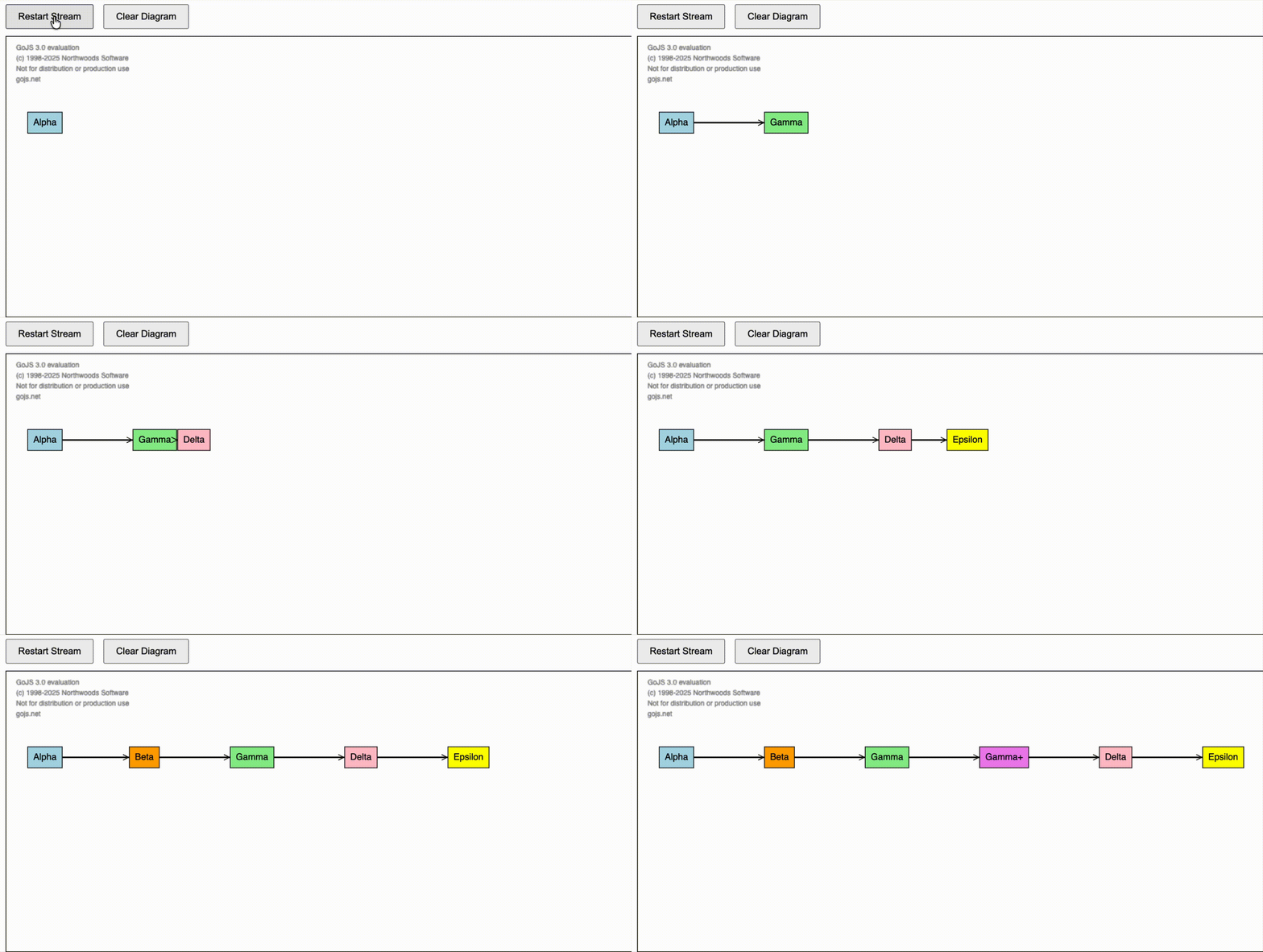
I’ll look into this later.

In the meantime you can try assigning the new nodes to start where you like. The model-only approach would be to add a data binding on the Node.location, so that you can assign the initial locations for the new node data.

I updated the updateDiagram function which does your suggestion however, as it stands, it’s pretty naive. It particularly will fail for the case where adjacent nodes are inserted at the same time. The snippet relies on the incoming node to always exist in the diagram so new nodes can determine a location value. I’ll continue to think about a more generic solution on my end as well.

<!DOCTYPE html>
<html>
  <head>
    <title>Stream and merge new model data</title>
    <!-- Copyright 1998-2024 by Northwoods Software Corporation. -->
  </head>

  <body>
    <div style="margin-bottom: 10px">
      <button onclick="loadDemoData()" style="padding: 8px 16px; cursor: pointer">Restart Stream</button>
      <button
        onclick="myDiagram.model = new go.GraphLinksModel([], [], {
        'linkKeyProperty': 'key'
      })"
        style="padding: 8px 16px; cursor: pointer; margin-left: 10px"
      >
        Clear Diagram
      </button>
    </div>
    <div style="width: 100%; display: flex; justify-content: space-between">
      <div id="myDiagramDiv" style="flex-grow: 1; height: 400px; border: solid 1px black"></div>
    </div>
    <textarea id="mySavedModel" style="width: 100%; height: 250px"></textarea>

    <script src="https://cdn.jsdelivr.net/npm/[email protected]/release/go.js"></script>
    <script id="code">
      const $ = go.GraphObject.make;

      const myDiagram = new go.Diagram("myDiagramDiv", {
        // make sure the top-left corner of the viewport is occupied
        contentAlignment: new go.Spot(0, 0.25),
        layout: $(go.TreeLayout, {
          layerSpacing: 100,
          nodeSpacing: 50,
          setsChildPortSpot: false,
          sorting: go.TreeSorting.Ascending,
        }),
        padding: new go.Margin(30, 250, 30, 30),
        scrollMargin: new go.Margin(30, 250, 30, 30),
        autoScrollRegion: new go.Margin(16, 48, 16, 48),
        allowMove: false,
        allowCopy: false,
        maxSelectionCount: 1,
        ModelChanged: (e) => {
          // just for demonstration purposes,
          if (e.isTransactionFinished) {
            // show the model data in the page's TextArea
            document.getElementById("mySavedModel").textContent = e.model.toJson();
          }
        },
      });

      myDiagram.nodeTemplate = $(
        go.Node,
        "Auto",
        { locationSpot: go.Spot.Center },
        new go.Binding("location", "loc", go.Point.parse),
        $(go.Shape, { fill: "white" }, new go.Binding("fill", "color")),
        $(go.TextBlock, { margin: 8 }, new go.Binding("text"))
      );

      myDiagram.linkTemplate = $(
        go.Link,
        {
          routing: go.Link.AvoidsNodes,
          reshapable: true,
          corner: 10,
          fromEndSegmentLength: 20,
          toEndSegmentLength: 20,
          deletable: false,
          movable: false,
        },
        // the highlight path Shape
        $(
          go.Shape,
          { isPanelMain: true, strokeWidth: 10, stroke: "transparent" },
          // when highlighted, show this thick Shape in red
          new go.Binding("stroke", "isHighlighted", (h) => (h ? "red" : "transparent")).ofObject()
        ),
        // the normal path Shape
        $(go.Shape, { isPanelMain: true, strokeWidth: 2 }),
        $(go.Shape, { toArrow: "OpenTriangle" })
      );

      // Initialize with empty model
      myDiagram.model = new go.GraphLinksModel([], [], {
        linkKeyProperty: "key",
      });

      // Function to update diagram with full model data using merge
      function updateDiagram(modelData) {
        const model = myDiagram.model;
        model.commit((m) => {
          if (modelData.modelData !== undefined) {
            m.assignAllDataProperties(m.modelData, modelData.modelData);
          }
          m.mergeNodeDataArray(
            modelData.nodeDataArray.map((n) => {
              // check if node exists in diagram already
              const node = myDiagram.findNodeForKey(n.key);

              // if not, try to position it relative to its incoming link's from node
              if (node === null) {
                const incomingLink = modelData.linkDataArray.find((l) => l.to === n.key);
                if (incomingLink !== undefined) {
                  const fromNode = myDiagram.findNodeForKey(incomingLink.from);
                  if (fromNode !== null) {
                    const fromLoc = fromNode.location;
                    return { ...n, loc: fromLoc.x + 150 + " " + fromLoc.y };
                  }
                }
              }
              return n;
            })
          );
          if (modelData.linkDataArray !== undefined && m instanceof go.GraphLinksModel) {
            m.mergeLinkDataArray(modelData.linkDataArray);
          }
        }, "merge data");
      }

      // Demo data - full diagram JSON for each step
      function loadDemoData() {
        const demoData = [
          {
            class: "go.GraphLinksModel",
            nodeDataArray: [{ key: 1, text: "Alpha", color: "lightblue" }],
            linkDataArray: [],
          },
          {
            class: "go.GraphLinksModel",
            nodeDataArray: [
              { key: 1, text: "Alpha", color: "lightblue" },
              { key: 3, text: "Gamma", color: "lightgreen" },
            ],
            linkDataArray: [{ key: -1, from: 1, to: 3 }],
          },
          {
            class: "go.GraphLinksModel",
            nodeDataArray: [
              { key: 1, text: "Alpha", color: "lightblue" },
              { key: 3, text: "Gamma", color: "lightgreen" },
              { key: 4, text: "Delta", color: "pink" },
            ],
            linkDataArray: [
              { key: -1, from: 1, to: 3 },
              { key: -2, from: 3, to: 4 },
            ],
          },
          {
            class: "go.GraphLinksModel",
            nodeDataArray: [
              { key: 1, text: "Alpha", color: "lightblue" },
              { key: 3, text: "Gamma", color: "lightgreen" },
              { key: 4, text: "Delta", color: "pink" },
              { key: 5, text: "Epsilon", color: "yellow" },
            ],
            linkDataArray: [
              { key: -1, from: 1, to: 3 },
              { key: -2, from: 3, to: 4 },
              { key: -3, from: 4, to: 5 },
            ],
          },
          {
            class: "go.GraphLinksModel",
            nodeDataArray: [
              { key: 1, text: "Alpha", color: "lightblue" },
              { key: 2, text: "Beta", color: "orange" },
              { key: 3, text: "Gamma", color: "lightgreen" },
              { key: 4, text: "Delta", color: "pink" },
              { key: 5, text: "Epsilon", color: "yellow" },
            ],
            linkDataArray: [
              { key: -1, from: 1, to: 2 },
              { key: -4, from: 2, to: 3 },
              { key: -2, from: 3, to: 4 },
              { key: -3, from: 4, to: 5 },
            ],
          },
          {
            class: "go.GraphLinksModel",
            nodeDataArray: [
              { key: 1, text: "Alpha", color: "lightblue" },
              { key: 2, text: "Beta", color: "orange" },
              { key: 3, text: "Gamma", color: "lightgreen" },
              { key: 3.5, text: "Gamma+", color: "violet" },
              { key: 4, text: "Delta", color: "pink" },
              { key: 5, text: "Epsilon", color: "yellow" },
            ],
            linkDataArray: [
              { key: -1, from: 1, to: 2 },
              { key: -4, from: 2, to: 3 },
              { key: -2, from: 3, to: 3.5 },
              { key: -5, from: 3.5, to: 4 },
              { key: -3, from: 4, to: 5 },
            ],
          },
        ];

        // Simulate streaming with delays
        demoData.forEach((data, index) => {
          setTimeout(() => updateDiagram(data), index * 1000);
        });
      }

      // Start demo on page load
      loadDemoData();
    </script>
  </body>
</html>

Isn’t it the case that almost always there is an incoming or previous node for any node that is inserted? And when there isn’t, you can use “0 0” or:

const root = myDiagram.findTreeRoots().first();
if (root) {
  myDiagram.model.addNodeData({ . . ., loc: go.Point.stringify(root.location) });
}

(or via a merge, in your case)

There in general will always be an incoming node for all nodes given the tree structure but there is definitely potential for a chain of nodes to get inserted at the same time.

Let’s say current diagram is
A → B

And it updates to
A → B → C → D

I can find the current node location of B based on the current diagram and calculate C’s position off of that but D can’t do the exact same with C since it has not been laid out yet in the current diagram. If I use the location data I calculated for C instead of using the diagram for help, then I’d have to ensure I visit C first in my loop so that D can be set.

What I’m thinking of doing is creating a dummy diagram on the side to help me traverse the layout for the new model, almost like a shadow diagram and use that to help generate the location values.

I’m still thinking through cases for handling it via this pattern but it feels like something easier should be possible since the layout when animating knows the final desired position of all nodes.

Big picture, I think what you suggested will be good for the base case which is a majority of the time. The next most likely is a chain of sequential nodes being added and then everything else is likely considered an edge case.

Figured I’d check with you first before I went down this route but it sounds like this is my only option.

It just occurred to me that maybe you would want to insert one node (and link) at a time, so that when you insert multiple nodes (and links) together, you actually insert them one node at a time. You’d want to implement an Animation.finished event handler or an “AnimationFinished” DiagramEvent listener to start the next animation, until you have no more nodes to add.

I actually was able to get my end goal with your original suggestion, just took a little extra work. I’ll go ahead and mark this post as resolved, thank you for the help.