I implemented a custom Dragging-Tool for my Diagram which displays an area filled with nodes. The Dragging-Tool does containment and collision checks when the node is moved/dropped inside the diagram.
The user has the option to open other areas alongside the existing diagram and drag and drop nodes between x diagrams. When the user now wants to move a node from Diagram A to Diagram B the custom Dragging tool doesn’t switch or register that the node got dragged out of bounds. When the user now drops the node in the new diagram the Dragging tool from the old diagram still executes its checks.
Is there a way to prevent the exeution of the doMouseMove and doMouseUp functions / stop the dragging tool as soon as the node left the bounds of the diagram?
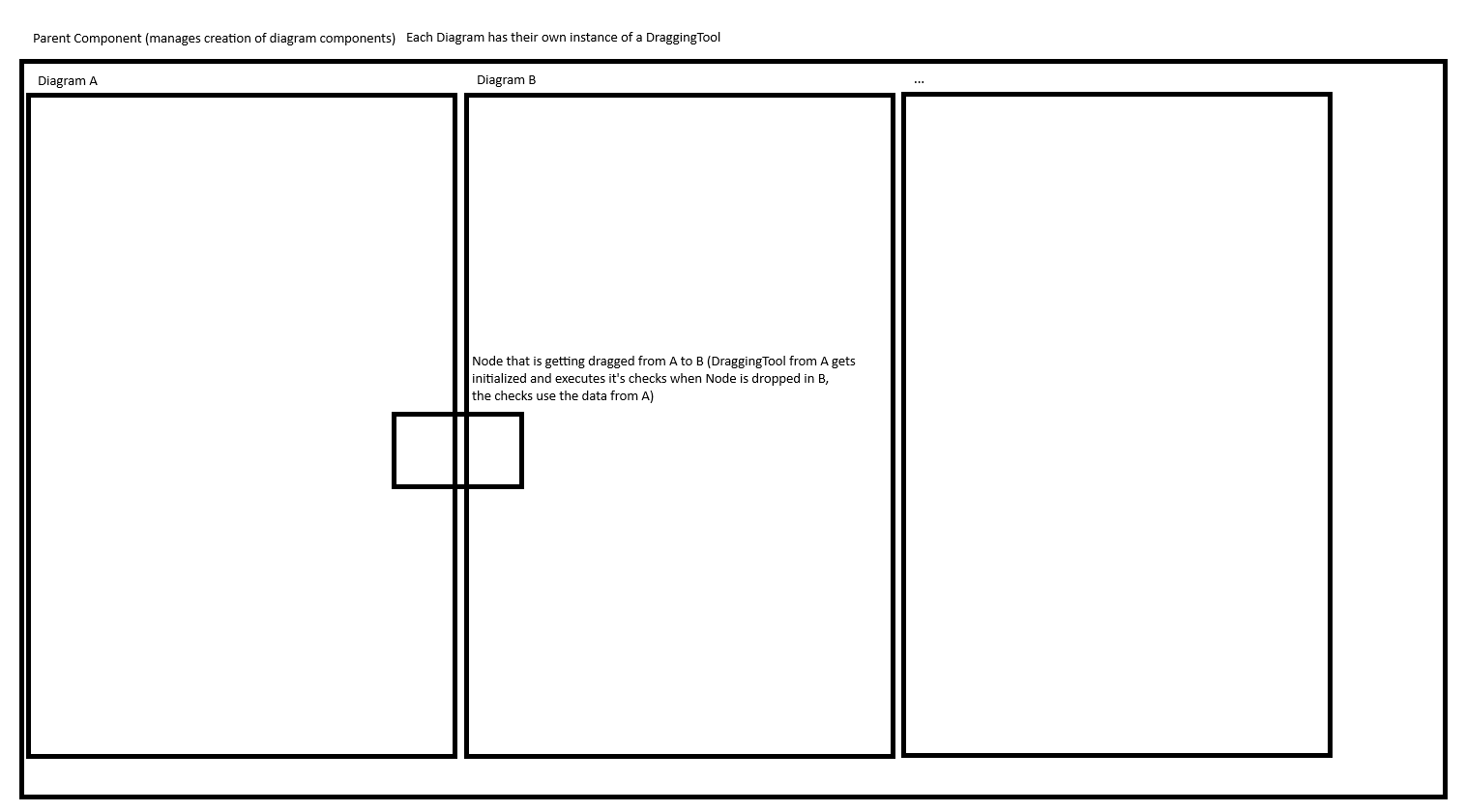
Down below a small illustration of the described use case.
When the user drags a node from Diagram A to Diagram B, A’s DraggingTool is operating, but the methods of B’s DraggingTool are being called. You’ll note how if the templates are different between Diagrams A and B, what is created and shown in Diagram B is different than what they see in Diagram A.
What state in Diagram B do you care about that you aren’t getting now?
I mainly care about the diagram variable of the dragging tool that i’m not getting. When I drop the node in B and print the current Diagram I get Diagram A instead of Diagram B.
Are those new Changes what you’re talking about? I’m currently using the 3.0.20 version of gojs.
Which DraggingTool instance? If you are getting Diagram A, you must have overridden the method on the one in Diagram A.
Note that an “ExternalObjectsDropped” DiagramEvent listener on Diagram B will get Diagram B as the DiagramEvent.diagram. The same is true for a GraphObject.mouseDrop event handler as the InputEvent.diagram. And besides, the second argument will be a GraphObject in target Diagram.
It’s odd because usually the problem is that you don’t know where the drag-and-drop came from, i.e. the source diagram.
Yeah both A and B are using seperated instances of the same CustomDraggingTool that I created.
Super simplified version of our CustomDraggingTool.
export class CustomDraggingTool extends go.DraggingTool {
  doActivate(): void {
    super.doActivate();

    // initialize data for custom placement service here for collision and       containment checks
  }

  doMouseMove(): void {
    super.doMouseMove();
    // do simple containment checks here and change cursor if node is outside an area
  }

  doMouseUp(): void {
    // check for collisions and containments based on the data we get from the diagram where the node is dropped
   super.doMouseUp();
  }
}
Inside the Component where we initialize the diagram we override the default dragging tool.
this.diagram.toolManager.draggingTool = new CustomDraggingTool();
Regarding the events you described. They would function for my use-case as well but I would prefer to try and solve it with a dragging tool since I could abort/cancel the action when a collision e.g. occurs.
The DraggingTool was designed so that while a cross-diagram drag-and-drop is happening, it’s mostly the target diagram’s templates and event handlers that are operating, not the source diagram’s. That’s why in each target diagram you see instances of its templates that are created (not the source diagram’s templates), using their behaviors, such as Part.dragComputation as well as GraphObject.mouseDragEnter, .mouseDragLeave, and .mouseDrop event handlers.
So I’m guessing that you are trying to reimplement everything in the source DraggingTool. That’s my guess based on your overriding the basic doMouseMove and doMouseUp methods, rather than more specific methods. Could your doActivate modify the target diagram’s ToolManager.draggingTool instance?
Yeah I’m searching for a solution to either reimplement it or find a way to know in the DraggingTool that the currently dragged Node was dragged out to another diagram.
Sadly I can’t modify the ToolManager.draggingTool in the doActivate since the diagrams doesn’t know from each other and so on I can’t access their ToolManager.
I create the Diagram Components inside the parent component using a for loop.
I also found a variable inside the DraggingTool called isDragOutStartedwhich doesn’t have a description anywhere and sadly always returns true.
So you have a variable number of similar diagrams, and drag-and-drop can happen between any of them? That should mean that for each Diagram you create, you replace its ToolManager.draggingTool with a new instance of your DraggingTool.
As I said above, when a drag-and-drop starts, it is the source diagram’s DraggingTool that is running, until the operation stops (either successfully or canceled). Note that there are really three Diagrams that might be relevant at any given time: the source diagram (whose Diagram.currentTool is the running DraggingTool), the diagram that the mouse has just left (if any), and the diagram that the mouse is over (if any). We don’t make these diagrams available as read-only properties in the API, but maybe we should.
You can find the source diagram via the undocumented read-only DraggingTool.draggingSource property, which is either a DraggingTool or null. That property is set when the isDragOutStarted property is set, which happens at the end of the doActivate method when allowDragOut is true, which obviously had better be true for any of this to work.
You can find the target diagram in your overrides of doMouseMove and doMouseUp by evaluating: this.diagram.lastInput.targetDiagram
I think when the mouse isn’t over any diagram viewport the value will be the source diagram, since that’s the value it will have while the mouse is inside the source diagram viewport.