GOJS Resize node with editable textBlock not working properly

Hi using the
“gojs”: “2.2.11”,

“gojs-react”: “1.1.1”,
i have one node template having a rounded Rectangle inside that i have used a textBlock with editable true, while using this i have tried to set the height and width in that case i am not able to resize the node, and with the same i am able to resize but not able to retain the resized height and width after reload.
another one is if the scale of the diagram is below 1 the editable textarea positions are misalign
i am using this template for this node.

 templmap.add("NotesNode",
          this.$(go.Node, "Auto",
            {
              locationSpot: go.Spot.Center,
              selectionObjectName: "BODY",
              selectionAdorned: false,
              resizable: true,
              resizeObjectName: "BODY",
            },
            new go.Binding("location", "loc", go.Point.parse).makeTwoWay(go.Point.stringify),
            this.$(
              go.Panel, "Auto",
              this.$(go.Shape, "RoundedRectangle",
                {
                  fill: "#111111",
                  stroke: "#979797",
                  strokeWidth: 1,
                  desiredSize: new go.Size(NaN, NaN), // allow dynamic sizing
                },
                new go.Binding("desiredSize", "desiredSize", go.Size.parse).makeTwoWay(go.Size.stringify)
              ),
              this.$(go.TextBlock,
                {
                  font: TextThemes.fontBold12,
                  editable: true,
                  stroke: "#ffffff",
                  textAlign: "left",
                  verticalAlignment: go.Spot.TopLeft,
                  margin: 8,
                  wrap: go.TextBlock.WrapDesiredSize,
                  overflow: go.TextBlock.OverflowEllipsis,
                  desiredSize: new go.Size(NaN, NaN), // allow dynamic sizing
                  text: "",
                  stretch: go.GraphObject.Fill,
                  isMultiline: true,
                  alignment: go.Spot.TopCenter,
                  position: new go.Point(0, 0),
                },
                new go.Binding("text").makeTwoWay(),
                new go.Binding("desiredSize", "txtdesiredSize", go.Size.parse).makeTwoWay(go.Size.stringify)
              ),
            )
          )
        );

i have used the textediting tool doActive

 diagram.toolManager.textEditingTool.doActivate = function() {
      go.TextEditingTool.prototype.doActivate.call(this);
      if (this.diagram.selection.count === 1) {
        let node = this.diagram.selection.first();
        if (node instanceof go.Node && node.data.category === "NotesNode") {
          let textEditor = document.getElementsByClassName("goTXarea");
          if (textEditor) {
            let scaleFactor = diagram.scale < 1 ? (10 - diagram.scale * 10) * 5 : 0;
            (textEditor[0] as HTMLElement).style.height = (node.actualBounds.height * diagram.scale - 20) + "px";
            (textEditor[0] as HTMLElement).style.width = (node.actualBounds.width * diagram.scale - 10) + "px";
            (textEditor[0] as HTMLElement).style.border = '1px solid #fff';
            const topValue = parseFloat((textEditor[0] as HTMLElement).style.top || "0");
            const leftValue = parseFloat((textEditor[0] as HTMLElement).style.left || "0");
            (textEditor[0] as HTMLElement).style.top = (topValue + scaleFactor) + "px";
            (textEditor[0] as HTMLElement).style.left = (leftValue + scaleFactor) + "px";
            (textEditor[0] as HTMLElement).style.background = '#111111';
            (textEditor[0] as HTMLElement).style.color = '#ffffff';
            (textEditor[0] as HTMLElement).style.fontSize = diagram.scale * 104 + '%';
          }
        }
      }
    };

also used this customResizeTool

 "resizingTool": (() => {
        class CustomResizingTool extends go.ResizingTool {
          resize(newr: go.Rect) {
            const diagram = this.diagram;
            diagram.selection.each((part: go.Part) => {
              if (part instanceof go.Link) return;
              const obj = part.resizeObject;
              const pos = part.position.copy();
              const angle = obj.getDocumentAngle();
              const sc = obj.getDocumentScale();
              const radAngle = (Math.PI * angle) / 180;
              const angleCos = Math.cos(radAngle);
              const angleSin = Math.sin(radAngle);
              const deltaWidth = newr.width - obj.naturalBounds.width;
              const deltaHeight = newr.height - obj.naturalBounds.height;
              const angleBottom = angle > 0 && angle < 180 ? 1 : 0;
              const angleLeft = angle > 90 && angle < 270 ? 1 : 0;
              const angleTop = angle > 180 && angle < 360 ? 1 : 0;
              pos.x +=
                sc *
                ((newr.x + deltaWidth * angleLeft) * angleCos -
                  (newr.y + deltaHeight * angleBottom) * angleSin);
              pos.y +=
                sc *
                ((newr.x + deltaWidth * angleTop) * angleSin +
                  (newr.y + deltaHeight * angleLeft) * angleCos);
              obj.desiredSize = newr.size;
              part.move(pos);
            });
          }
        }
        return new CustomResizingTool();
      })(),

using this i am adding the node in the diagram

 diagram.model.addNodeData({
      category: "NotesNode",
      key: NoteKey,
      loc: go.Point.stringify(loc),
      text: "New \n Note",
    });

and the results are like this
of the scale is 0.6 text area is not align with the node itself
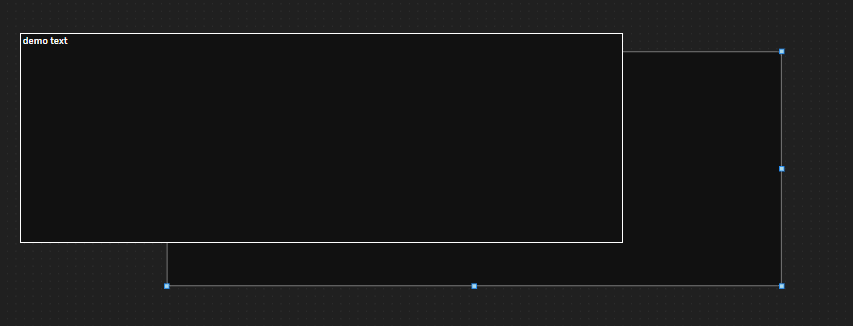
after resize i am reloading the diagram in that case unable to retain the same resized height and width
after reload it takes the default size
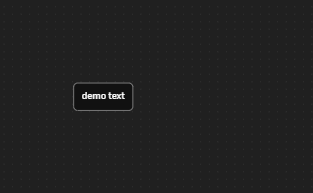
i have tried using setting the height and width or dezired size after that not able to resize the node

It appears that your template is basically of the form:

Node, "Auto"
    Panel, "Auto"
        Shape, "RoundedRectangle"
        TextBlock

First, it doesn’t make sense to have an “Auto” Panel with just one element in it. The purpose of an “Auto” Panel is to automatically resize the panel’s main element to wrap around the other element(s). So if I were you, I would excise the inner “Auto” Panel.

Node, "Auto"
    Shape, "RoundedRectangle"
    TextBlock

Second, normally the size of an “Auto” Panel is determined by the size(s) of the contained elements surrounded by the main element. If you want to constrain the size of the panel, you can do so. But you should not be setting/binding the size of the border/main element. So if I were you, I would move the “desiredSize” binding from the Shape to the “Auto” Node. Remove the setting of desiredSize to NaN,NaN too – that is superfluous since that is its default value and shouldn’t be set/bound anyway.

You have specified that the selectionObjectName and resizeObjectName should be the element named “BODY”, but there is no such element. That’s actually good, because I don’t think you want to specify some element to resize – you want the user to resize the whole Node. So if I were you I would remove the settings of those two Node properties.

Did you really want to control the size of the TextBlock independently of the size of the “Auto” Panel? I don’t understand why you want to do that. It normally isn’t needed if you want to control the size of either the TextBlock or the Node.

What are you trying to accomplish in the customization of the TextEditingTool?

Hi, thanks! I’m now able to resize the node and set the desired size after reload. I’ve also removed the TextEditingTool. However, I’m still facing an issue with the position of the editable TextBlock when the scale is below 1. The editable text area doesn’t align correctly with the node.

What I want is for the editable text area to match the size and position of the parent node, so it appears as if I’m editing the text directly inside the node.

diagram.toolManager.textEditingTool.doActivate = function() {
      go.TextEditingTool.prototype.doActivate.call(this);
      if (this.diagram.selection.count === 1) {
        let node = this.diagram.selection.first();
        if (node instanceof go.Node && node.data.category === "NotesNode") {
          let textEditor = document.getElementsByClassName("goTXarea");
          if (textEditor) {
            let scaleFactor = diagram.scale < 1 ? (10 - diagram.scale * 10) * 5 : 0;
            (textEditor[0] as HTMLElement).style.height = (node.actualBounds.height * diagram.scale - 20) + "px";
            (textEditor[0] as HTMLElement).style.width = (node.actualBounds.width * diagram.scale - 10) + "px";
            (textEditor[0] as HTMLElement).style.border = '1px solid #fff';
            const topValue = parseFloat((textEditor[0] as HTMLElement).style.top || "0");
            const leftValue = parseFloat((textEditor[0] as HTMLElement).style.left || "0");
            (textEditor[0] as HTMLElement).style.top = (topValue + scaleFactor) + "px";
            (textEditor[0] as HTMLElement).style.left = (leftValue + scaleFactor) + "px";
            (textEditor[0] as HTMLElement).style.background = '#111111';
            (textEditor[0] as HTMLElement).style.color = '#ffffff';
            (textEditor[0] as HTMLElement).style.fontSize = diagram.scale * 104 + '%';
          }
        }
      }
    };

i have tried using this to set the height width and position using this i am able to set the height and width of the text area but the positions is not correct please help me for this now.

I assume you removed the custom ResizingTool.

I do not understand your scaleFactor calculation.

Do you want the textarea size to be fixed rather than depend on the initial size of the TextBlock?

I think the main problem is that the standard TextEditingTool behavior (actually, the standard TextEditingTool.defaultTextEditor HTMLInfo.show behavior) is to make sure that the textarea is never smaller than the default scale, so that the textarea editor remains legible even when the user is zoomed out. So you can set TextEditingTool.minimumEditorScale to a value less than its default value of 1.

Here’s my sample using your code. Note how I have commented out some of your code.

<!DOCTYPE html>
<html>
<head>
  <title>Minimal GoJS Sample</title>
  <!-- Copyright 1998-2025 by Northwoods Software Corporation. -->
</head>
<body>
  <div id="myDiagramDiv" style="border: solid 1px black; width:100%; height:400px"></div>
  <textarea id="mySavedModel" style="width:100%;height:250px"></textarea>

  <script src="https://cdn.jsdelivr.net/npm/gojs/release/go-debug.js"></script>
  <script id="code">
const myDiagram =
  new go.Diagram("myDiagramDiv", {
      "undoManager.isEnabled": true,
      "ModelChanged": e => {     // just for demonstration purposes,
        if (e.isTransactionFinished) {  // show the model data in the page's TextArea
          document.getElementById("mySavedModel").textContent = e.model.toJson();
        }
      }
    });

myDiagram.toolManager.textEditingTool.doActivate = function() {
    this.minimumEditorScale = 0.1;
    go.TextEditingTool.prototype.doActivate.call(this);
    const diagram = this.diagram;
    const tb = this.textBlock;
    if (!tb) return;
    const node = tb.part;
    if (node instanceof go.Node /*&& node.data.category === "NotesNode"*/) {
      let textarea = document.getElementsByClassName("goTXarea")[0];
      if (textarea) {
        //let scaleFactor = diagram.scale < 1 ? (10 - diagram.scale * 10) * 5 : 0;
        textarea.style.height = (node.actualBounds.height * diagram.scale) + "px";
        textarea.style.width = (node.actualBounds.width * diagram.scale) + "px";
        textarea.style.border = '1px solid #fff';
        //const topValue = parseFloat(textarea.style.top || "0");
        //const leftValue = parseFloat(textarea.style.left || "0");
        //textarea.style.top = (topValue + scaleFactor) + "px";
        //textarea.style.left = (leftValue + scaleFactor) + "px";
        textarea.style.background = '#111111';
        textarea.style.color = '#ffffff';
        textarea.style.fontSize = diagram.scale * 100 + '%';
      }
    }
  };

myDiagram.nodeTemplate =
  new go.Node("Auto", {
      locationSpot: go.Spot.Center,
      selectionAdorned: false,
      resizable: true
    })
    .bindTwoWay("desiredSize", "size", go.Size.parse, go.Size.stringify)
    .add(
      new go.Shape({ fill: "#111111", stroke: "#979797" })
        .bind("fill", "color"),
      new go.TextBlock({
          //font: TextThemes.fontBold12,
          editable: true,
          stroke: "#ffffff",
          textAlign: "left",
          verticalAlignment: go.Spot.TopLeft,
          //margin: 8,
          wrap: go.TextBlock.WrapDesiredSize,
          overflow: go.TextBlock.OverflowEllipsis,
          //desiredSize: new go.Size(NaN, NaN), // allow dynamic sizing
          //text: "",
          stretch: go.GraphObject.Fill,
          isMultiline: true,
          //alignment: go.Spot.TopCenter,
          //position: new go.Point(0, 0),
        })
        .bindTwoWay("text")
    );

myDiagram.model = new go.GraphLinksModel(
[
  { key: 1, text: "Alpha", color: "blue", size: "60 35" },
  { key: 2, text: "Beta", color: "orange", size: "80 25" },
  { key: 3, text: "Gamma", color: "green", size: "80 35" },
  { key: 4, text: "Delta", color: "red", size: "30 30" }
],
[
  { from: 1, to: 2 },
  { from: 1, to: 3 },
  { from: 2, to: 2 },
  { from: 3, to: 4 },
  { from: 4, to: 1 }
]);
  </script>
</body>
</html>