Groups and ports issue

I have nodes and groups with ports defined like this:


function addInternalLinkPorts(fromNotLinkable)
{
  return [
    $go(go.Shape, "Rectangle",
      {
        fromLinkable: !fromNotLinkable, toLinkable: true, cursor: "pointer",
        fromLinkableDuplicates: true, toLinkableDuplicates: true,
        portId: "topPort", fromSpot: go.Spot.TopSide, toSpot: go.Spot.TopSide,
        alignment: go.Spot.TopCenter,
        opacity: 0
      },
      new go.Binding("toLinkable", "category", function (c) { return c !== "start"; }),
      new go.Binding("desiredSize", "", function(data) { return scope.myDiagram.edgeSpreadEnabled ? new go.Size(internalPortSpreadSize - 1, 1) : new go.Size(1, 1)}),
    ),
    $go(go.Shape, "Rectangle",
      {
        fromLinkable: !fromNotLinkable, toLinkable: true, cursor: "pointer",
        fromLinkableDuplicates: true, toLinkableDuplicates: true,
        portId: "leftPort", fromSpot: go.Spot.LeftSide, toSpot: go.Spot.LeftSide,
        alignment: go.Spot.LeftCenter,
        opacity: 0
      },
      new go.Binding("toLinkable", "category", function (c) { return c !== "start"; }),
      new go.Binding("desiredSize", "", function(data) { return scope.myDiagram.edgeSpreadEnabled ? new go.Size(1, internalPortSpreadSize - 1) : new go.Size(1, 1)}),
    ),
    $go(go.Shape, "Rectangle",
      {
        fromLinkable: !fromNotLinkable, toLinkable: true, cursor: "pointer",
        fromLinkableDuplicates: true, toLinkableDuplicates: true,
        portId: "rightPort", fromSpot: go.Spot.RightSide, toSpot: go.Spot.RightSide,
        alignment: go.Spot.RightCenter,
        opacity: 0
      },
      new go.Binding("toLinkable", "category", function (c) { return c !== "start"; }),
      new go.Binding("desiredSize", "", function(data) { return scope.myDiagram.edgeSpreadEnabled ? new go.Size(1, internalPortSpreadSize - 1) : new go.Size(1, 1);}),
    ),
    $go(go.Shape, "Rectangle",
      {
        fromLinkable: !fromNotLinkable, toLinkable: true, cursor: "pointer",
        fromLinkableDuplicates: true, toLinkableDuplicates: true,
        portId: "bottomPort", fromSpot: go.Spot.BottomSide, toSpot: go.Spot.BottomSide,
        alignment: go.Spot.BottomCenter,
        opacity: 0
      },
      new go.Binding("toLinkable", "category", function (c) { return c !== "start"; }),
      new go.Binding("desiredSize", "", function(data) { return scope.myDiagram.edgeSpreadEnabled ? new go.Size(internalPortSpreadSize - 1, 1) : new go.Size(1, 1);}),
    )
  ]
}

The purpose is that the edges spread in and out of nodes by using go.Spot.LeftSide etc.
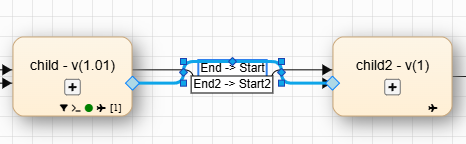
It works for all nodes, but for Groups, it causes kinks like so:

I tracked down the issue and it happens in this part of the minified source code:
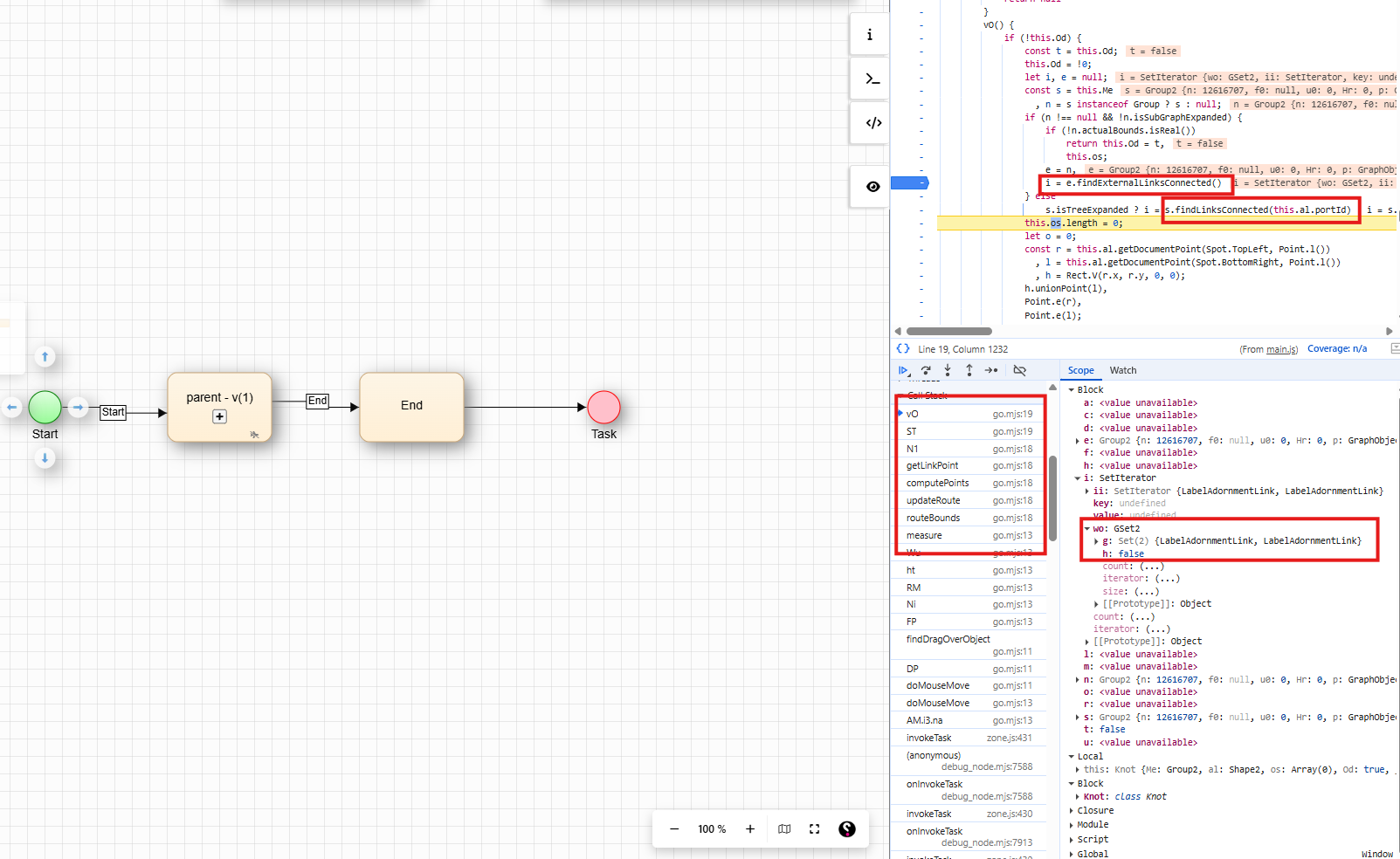
Essentially, it looks like for groups it uses findExternalLinksConnected which returns links from all ports, whereas for nodes it uses s.findLinksConnected(this.al.portId) which uses the port. This means that for the spreading purposes, it thinks there are 2 links on each side rather than 1 link on each side.

For now, I am using a workaround by overwritting computeSpot in a custom Link class, but would appreciate some feedback if there is a better fix and/or workaround

It isn’t clear to me what the graph is that you are showing. How many links are there, and precisely which ports do they connect on which nodes/groups?

When a link connects a member node of a group with some node outside of the group, and the group is collapsed, the link effectively connects with the default port of the group, not with any specific ports that you happen to have on the group. That might explain the behavior that you are seeing, but I’m not sure what situation you have.

<!DOCTYPE html>
<html>
<head>
  <title>Minimal GoJS Sample</title>
  <!-- Copyright 1998-2026 by Northwoods Software Corporation. -->
</head>
<body>
  <div id="myDiagramDiv" style="border: solid 1px black; width:100%; height:400px"></div>
  <textarea id="mySavedModel" style="width:100%;height:250px"></textarea>

  <script src="https://cdn.jsdelivr.net/npm/gojs/release/go-debug.js"></script>
  <script id="code">
const myDiagram =
  new go.Diagram("myDiagramDiv", {
      layout: new go.TreeLayout({ setsPortSpot: false, setsChildPortSpot: false }),
      "undoManager.isEnabled": true,
      "ModelChanged": e => {     // just for demonstration purposes,
        if (e.isTransactionFinished) {  // show the model data in the page's TextArea
          document.getElementById("mySavedModel").textContent = e.model.toJson();
        }
      }
    });

function addPorts(node) {  // add both an input port and an output port
  node.add(
    new go.Shape({
      width: 5, height: 50, fill: "transparent", stroke: "gray",
      alignment: go.Spot.Left,
      portId: "L", toSpot: go.Spot.LeftSide
    }),
    new go.Shape({
      width: 5, height: 50, fill: "transparent", stroke: "gray",
      alignment: go.Spot.Right,
      portId: "R", fromSpot: go.Spot.RightSide
    })
  )
}

myDiagram.nodeTemplate =
  new go.Node("Auto", { width: 120, height: 80 })
    .add(
      new go.Shape({
          fill: "white",
          // when there's just a single port on each node
          portId: "", fromSpot: go.Spot.RightSide, toSpot: go.Spot.LeftSide
        })
        .bind("fill", "color"),
      new go.TextBlock()
        .bind("text")
    )
    .apply(addPorts);

myDiagram.groupTemplate =
  new go.Group("Auto", { minSize: new go.Size(120, 80), isSubGraphExpanded: false })
    .add(
      new go.Shape({
          fill: "white",
          // when there's just a single port on each group
          portId: "", fromSpot: go.Spot.RightSide, toSpot: go.Spot.LeftSide
        })
        .bind("fill", "color"),
      new go.Panel("Vertical")
        .add(
          new go.TextBlock()
            .bind("text"),
          go.GraphObject.build("SubGraphExpanderButton"),
          new go.Placeholder({ padding: 10 })
        )
    )
    .apply(addPorts);

myDiagram.model = new go.GraphLinksModel({
  linkFromPortIdProperty: "fid",
  linkToPortIdProperty: "tid",
  nodeDataArray: [
    { key: 1, text: "Alpha", color: "lightblue" },
    { key: 2, text: "Beta", color: "orange" },
    { key: 3, text: "Gamma", color: "lightgreen", isGroup: true },
    { key: 4, text: "Delta", color: "pink" },
    { key: 11, text: "G1", group: 3 },
    { key: 12, text: "G2", group: 3 },
  ],
  linkDataArray: [
    { from: 1, fid: "R", to: 2, tid: "L" },
    { from: 2, fid: "R", to: 3, tid: "L" },
    { from: 3, fid: "R", to: 4, tid: "L" },
    { from: 11, fid: "R", to: 12, tid: "L" },
    { from: 2, fid: "R", to: 11, tid: "L" },
    { from: 12, fid: "R", to: 4, tid: "L" },
  ]
});
  </script>
</body>
</html>

Hi walter,

The links are direct to the group, not to any node inside of it - in our case, the child nodes are lazy loaded when the user clicks the expand button so the group is actually empty when the issue occurs.

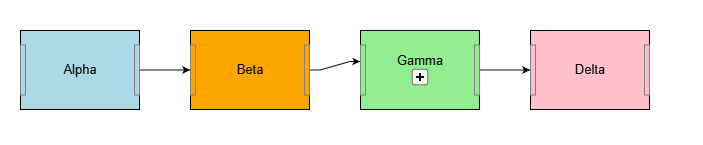
But I think that’s besides the point - even your example exhibits the same behaviour. Links between two nodes are parallel whereas links in and out of groups are not. This seems to be because the group thinks there are 4 links on each side rather than 2 for the purpose of doing the spreading.

OK, so I’ll assume you have two links between nodes/groups, and there are no group members.

I’ll look into what’s happening. Another problem that might be related is how the positioning of the link end points isn’t consistent and changes if you move the group slightly.

Thank you for looking into it. Just to be clear, the 2 links just makes it more obvious but the issue happens when there is only 1 link as well (as seen below). And yes, if you move stuff around it would of course no longer be aligned - but in our case we use snap-to-grid and also want the relayout (using go.LayeredDigraphLayout) to ideally result in straight lines.

A post was split to a new topic: Changing location of Groups

OK, this should be improved in 3.1.8, which we should be releasing soon.

1 Like

Thank you. In the meantime, is there any workaround for it by overriding some method on the Link class?

We’re planning on releasing 3.1.8 late today.

Thank you, it does seem to work better. We do get issues like below on relayout (using LayeredDigraphLayout) - weirdly it happens when you relayout a second time after relayouting once. But that might be to do with other things like the link labels. We can’t upgrade to 3.1.8 for a few weeks anyway so I’ll have to investigate more then. For now I’ll mark it as solved.