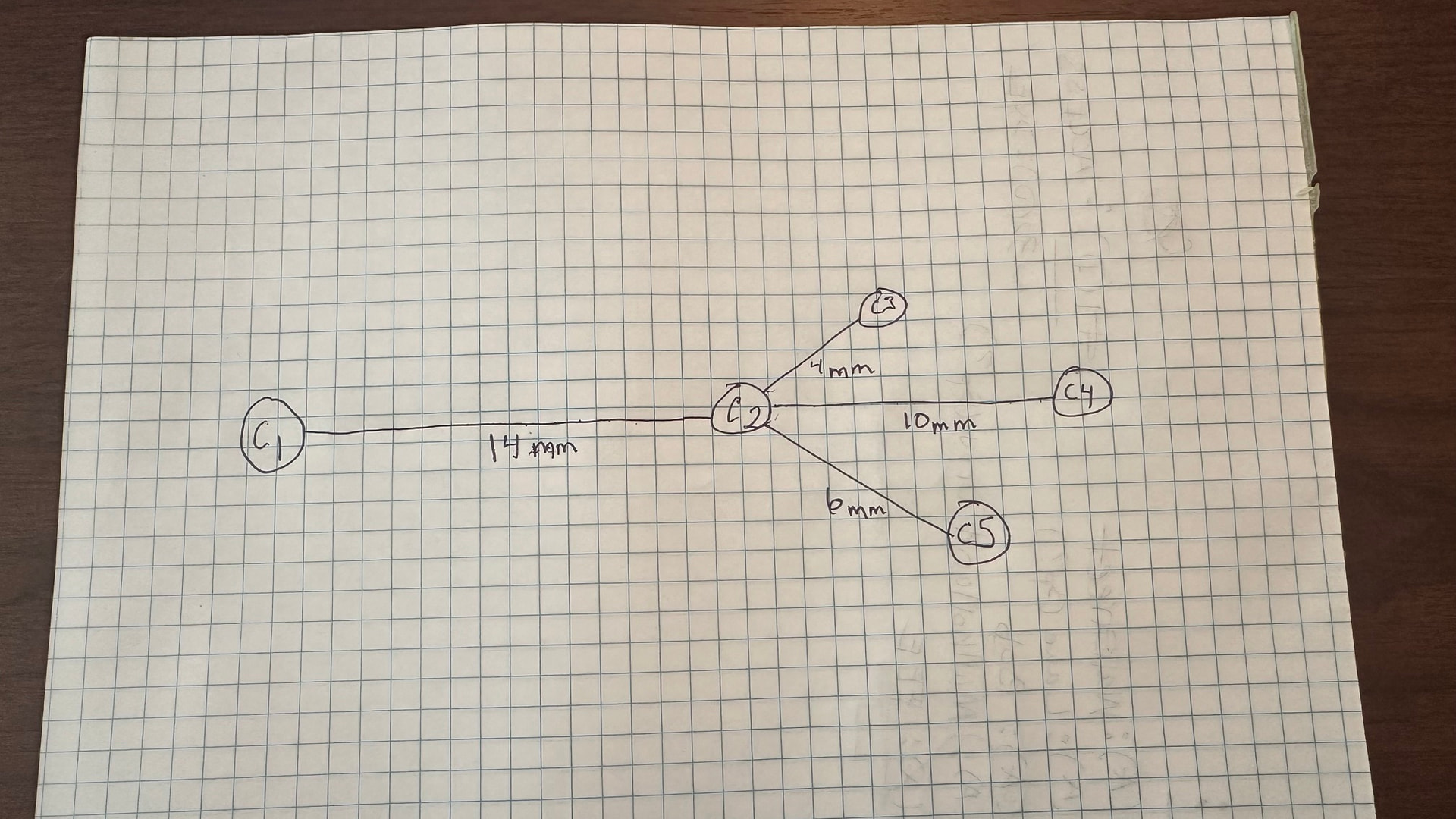
I need a tree-type layout where the lengths of the links are proportional to one another and are dictated by a bound field with the length value. I don’t care about actual scale at this point, just that a link with length 10 is twice as long as a link with length 5.
I am having a hard time figuring this out. Can someone point me in the right direction?
There’s no easy built-in way to do this, but you could write a custom TreeLayout where during commitNodes, you spread out the depths based on some link data.length, like this:
I have your suggestion working, but now I need an enhancement. Is there any way to make a node draggable by the user but constrain its movement to a fixed radius around the port at the other end of the node?
For example, in my drawing, I want to drag node C2 do a different location, but the incoming link length must remain fixed at 14mm, so I can essentially only move it in an arc around C1. All the descendant nodes and links should move together as a unit, but I already have that part working.
First I highly recommend you set 'draggingTool.dragsTree': true, in your Diagram options, or else you’re going to have some bigger headaches as moving one node accurately will displace all the nodes its linking to. dragsTree makes the whole tree move as one.
    window.myDiagram = new go.Diagram('myDiagramDiv', {
      'draggingTool.dragsTree': true,
      // ... other Diagram properties
    });
You’re going to want to make a dragComputation function for your Node template. Here is one that should work, and will work even if you select multiple nodes in many disjoint trees:
// NOTE assumes draggingTool.dragsTree is true
function orbitDragComputation(node, pt, gridpt) {
  const dragged = node.diagram.toolManager.draggingTool.draggedParts;
  // a part's location when the drag started
  const startLoc = (p) => {
    const info = dragged !== null ? dragged.get(p) : null;
    return info !== null ? info.point : p.location;
  };

  // find the topmost node being dragged along this tree-parent chain
  let top = node;
  let parent = top.findTreeParentNode();
  while (parent !== null && dragged !== null && dragged.has(parent)) {
    top = parent;
    parent = top.findTreeParentNode();
  }
  if (parent === null) return gridpt; // a whole tree moves freely

  // the mouse delta implied by the proposed point for this node
  const nodeStart = startLoc(node);
  const dx = pt.x - nodeStart.x;
  const dy = pt.y - nodeStart.y;

  // offset from top's location to its center (constant during the drag)
  const cb = top.actualBounds;
  const cox = cb.centerX - top.location.x;
  const coy = cb.centerY - top.location.y;

  const topStart = startLoc(top);
  const pb = parent.actualBounds;
  // radius: parent center to top's center at drag start
  const rx = topStart.x + cox - pb.centerX;
  const ry = topStart.y + coy - pb.centerY;
  const radius = Math.sqrt(rx * rx + ry * ry);

  // project top's proposed center onto the orbit circle
  const vx = topStart.x + dx + cox - pb.centerX;
  const vy = topStart.y + dy + coy - pb.centerY;
  const d = Math.sqrt(vx * vx + vy * vy);
  if (d < 0.0001 || radius < 0.0001) return node.location.copy();
  const s = radius / d;

  // the constrained delta for top, applied to this node's start location
  const cdx = vx * s - rx;
  const cdy = vy * s - ry;
  return new go.Point(nodeStart.x + cdx, nodeStart.y + cdy);
}
then use it in your node template:
        myDiagram.nodeTemplate = new go.Node('Auto', {
          dragComputation: orbitDragComputation
          // ... other node properties
        }
There might be a simpler drag computation that would work, but maybe not.