@walter for moving nodes it works.
However, in one place in our product when we modify diagram
diagram.links.each(l => l.invalidateRoute());
doesn’t cause the link routes to update as expected.
The modification includes three steps:
-
Remove the link between Step 1 and Step 2
I iterate through all links, find the one with { from: 1, to: 2 }, and remove it from the model.
-
Add a new link between Step 1 and Step 3
I call model.addLinkData({ from: 1, to: 3 }).
-
Remove the entire Step 2 node
I locate the node with key 2 and remove it, which also removes any links connected to it.
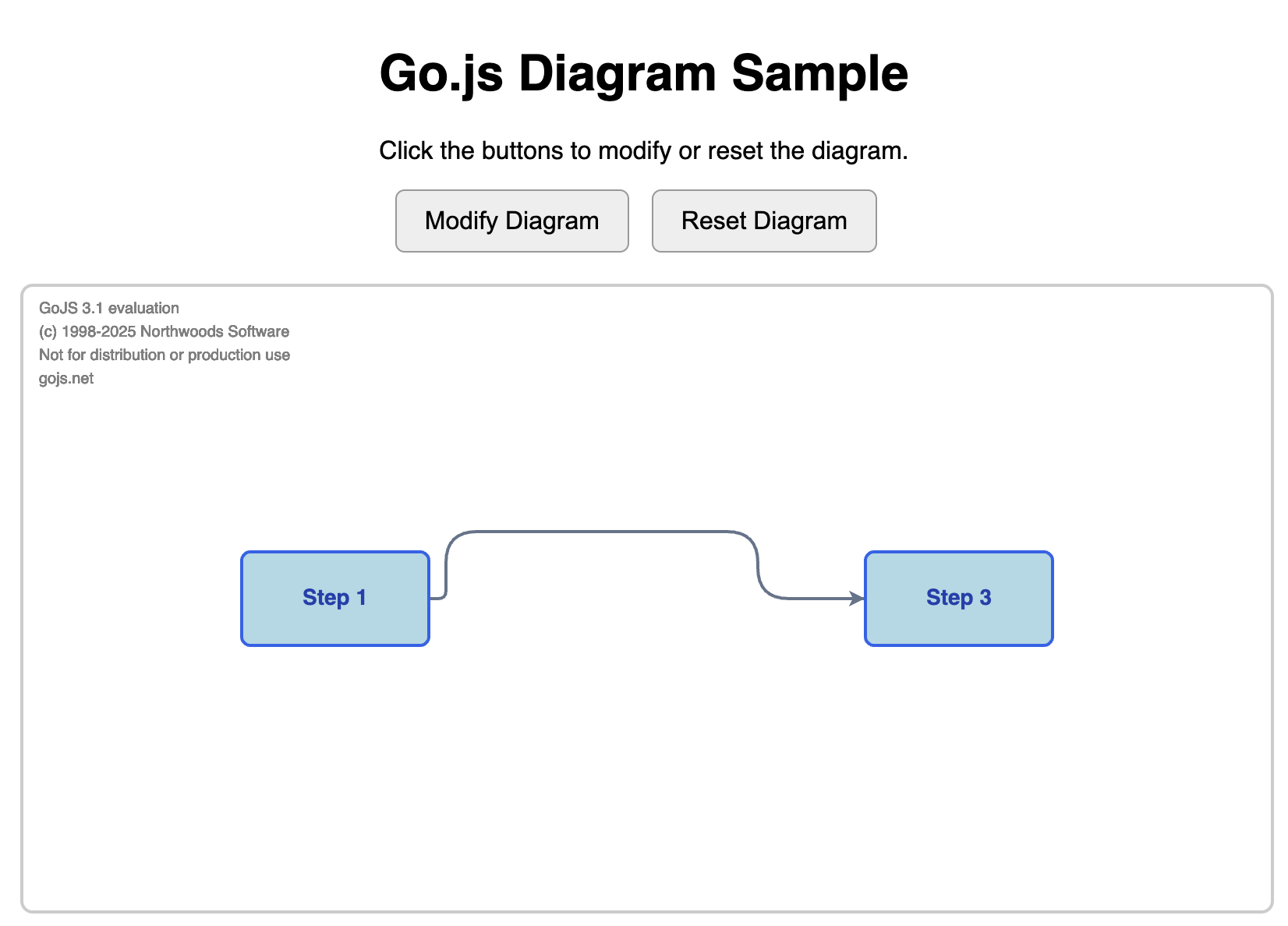
After these changes, the diagram updates correctly in terms of data, but the link routing remains stale. Calling invalidateRoute() on all links doesn’t trigger a route recalculation — the link visually stays in its old position until I manually move one of the nodes.
I’m looking for guidance on why invalidateRoute() doesn’t reroute in this scenario, and what the recommended way is to force all links to recompute their paths after programmatic diagram changes.
We cannot currently change the order of the steps mentioned above. Here is the example to reproduce the issue: when you click on “Modify Diagram”, I expect the connection to be sstraight; however,it stays curved.
<!DOCTYPE html>
<html lang="en">
<head>
  <meta charset="UTF-8" />
  <title>GoJS Diagram Sample</title>
  <script src="https://cdn.jsdelivr.net/npm/gojs/release/go-debug.js"></script>

  <style>
    body {
      font-family: sans-serif;
      margin: 0;
      padding: 20px;
      display: flex;
      flex-direction: column;
      align-items: center;
    }
    #diagramDiv {
      width: 800px;
      height: 400px;
      border: 2px solid #ccc;
      border-radius: 8px;
      margin-top: 20px;
    }
    button {
      padding: 10px 18px;
      font-size: 16px;
      cursor: pointer;
      border-radius: 6px;
      border: 1px solid #999;
      background: #eee;
      margin-right: 10px;
    }
    button:hover {
      background: #e3e3e3;
    }
  </style>
</head>

<body>
  <div style="text-align:center; max-width:800px;">
    <h1>Go.js Diagram Sample</h1>
    <p>Click the buttons to modify or reset the diagram.</p>

    <button id="modifyBtn">Modify Diagram</button>
    <button id="resetBtn">Reset Diagram</button>

    <div id="diagramDiv"></div>
  </div>

  <script>
    const $ = go.GraphObject.make;
    let diagram = null;

    const initialNodes = [
      { key: 1, text: "Step 1", loc: "0 0" },
      { key: 2, text: "Step 2", loc: "200 0" },
      { key: 3, text: "Step 3", loc: "400 0" },
    ];

    const initialLinks = [
      { from: 1, to: 2 },
      { from: 2, to: 3 }
    ];

    function initDiagram() {
      diagram = $(go.Diagram, "diagramDiv", {
        "undoManager.isEnabled": true
      });

      diagram.nodeTemplate = $(
        go.Node, "Auto",
        new go.Binding("location", "loc", go.Point.parse).makeTwoWay(go.Point.stringify),
        $(go.Shape, "RoundedRectangle", {
          fill: "lightblue",
          strokeWidth: 2,
          stroke: "#2563eb",
          width: 120,
          height: 60
        }),
        $(go.TextBlock,
          {
            margin: 10,
            font: "bold 14px sans-serif",
            stroke: "#1e40af"
          },
          new go.Binding("text", "text")
        )
      );

      diagram.linkTemplate = $(
        go.Link,
        {
          routing: go.Link.AvoidsNodes,
          curve: go.Link.JumpOver,
          corner: 20
        },
        $(go.Shape, { strokeWidth: 2, stroke: "#64748b" }),
        $(go.Shape, { toArrow: "Standard", fill: "#64748b", stroke: "#64748b" })
      );

      resetModel();
    }

    function resetModel() {
      diagram.model = new go.GraphLinksModel(
        JSON.parse(JSON.stringify(initialNodes)),
        JSON.parse(JSON.stringify(initialLinks))
      );
    }

    function modifyDiagram() {
      if (!diagram) return;

      const model = diagram.model;

      // 1. Remove link 1 → 2
      diagram.links.each(link => {
        const data = link.data;
        if (data.from === 1 && data.to === 2) {
          model.removeLinkData(data);
        }
      });

      // 2. Add link 1 → 3
      model.addLinkData({ from: 1, to: 3 });

      // 3. Remove node 2
      const node2 = diagram.findNodeForKey(2);
      if (node2) diagram.remove(node2);

      diagram.links.each(l => l.invalidateRoute());
    }

    document.addEventListener("DOMContentLoaded", () => {
      initDiagram();
      document.getElementById("modifyBtn").onclick = modifyDiagram;
      document.getElementById("resetBtn").onclick = resetModel;
    });
  </script>
</body>
</html>