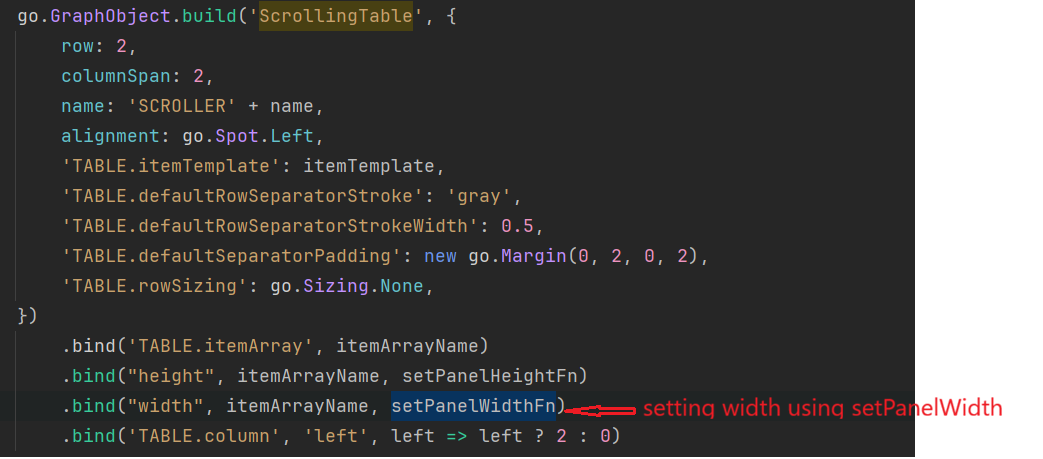
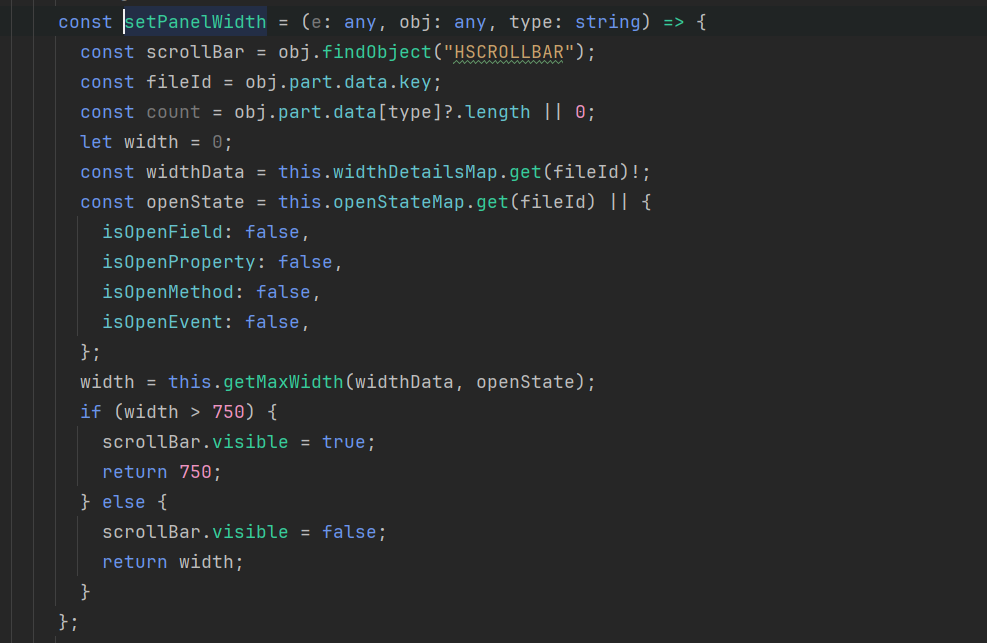
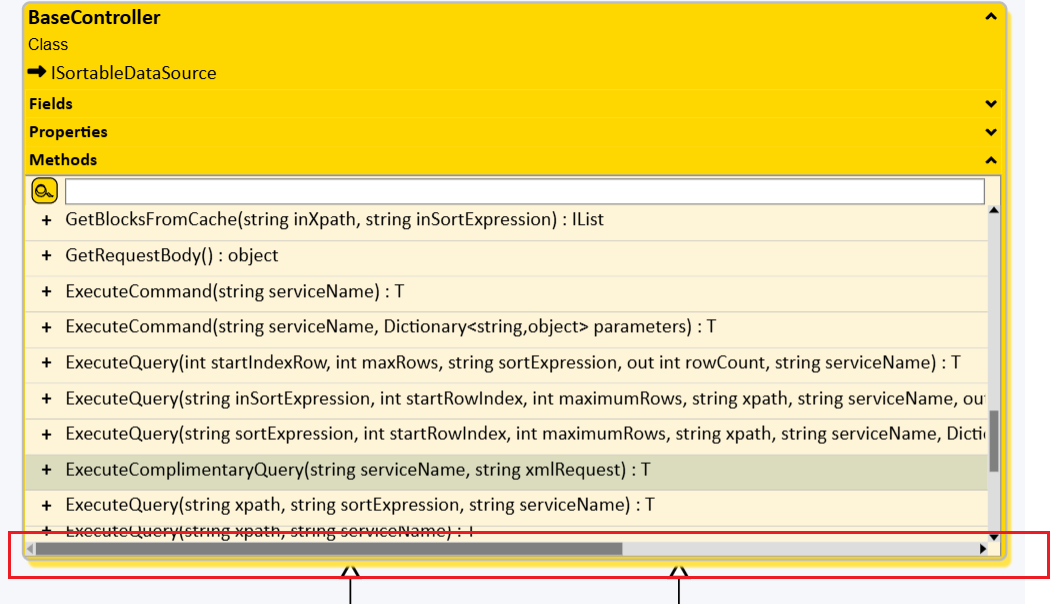
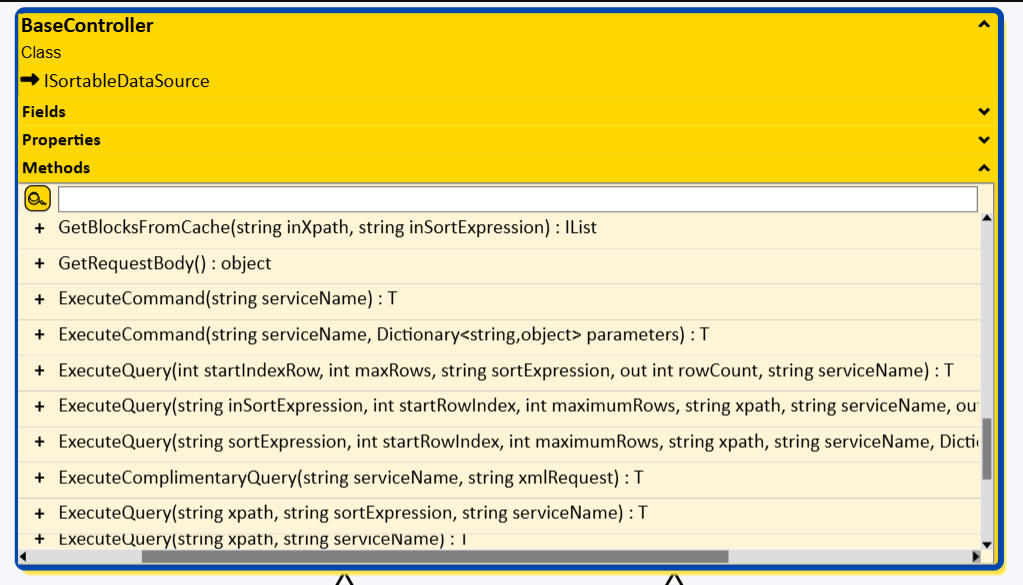
Added a scrolling table to the nodes. The vertical scrollbar is working properly. Now I want to add a horizontal scrollbar. I designed the horizontal scrollbar and the scrolling works, but I am not able to scroll the table rows (content) with the scrollbar. I have included the code and a screenshot of the UI below.
Note: I have made some changes in ScrollingTable.ts for the horizontal scrollbar. Please refer to the modified ScrollingTable.ts below.
- UI Interface
- ScrollingTable.ts
/*
 *  Copyright 1998-2025 by Northwoods Software Corporation. All Rights Reserved.
 */

/*
 * This is an extension and not part of the main GoJS library.
 * The source code for this is at extensionsJSM/ScrollingTable.ts.
 * Note that the API for this class may change with any version, even point releases.
 * If you intend to use an extension in production, you should copy the code to your own source directory.
 * Extensions can be found in the GoJS kit under the extensions or extensionsJSM folders.
 * See the Extensions intro page (https://gojs.net/latest/intro/extensions.html) for more information.
 */

import * as go from 'gojs';

// A "ScrollingTable" Panel

// This defines an "AutoRepeatButton" Panel,
// which is used by the scrollbar in the "ScrollingTable" Panel.

// It is basically a custom "Button" that automatically repeats its click
// action when the user holds down the mouse.
// The first extra argument may be a number indicating the number of milliseconds
// to wait between calls to the click function.  Default is 50.
// The second extra argument may be a number indicating the number of milliseconds
// to delay before starting calls to the click function.  Default is 500.

// Example:
//   go.GraphObject.build("AutoRepeatButton", {
//       click: (e, button) => doSomething(button.part)
//     }, 150)  // slower than the default 50 milliseconds between calls
//     .add(
//       new go.Shape("Circle", { width: 8, height: 8 })
//     )
if (!go.GraphObject.isBuilderDefined || !go.GraphObject.isBuilderDefined('AutoRepeatButton')) {
  go.GraphObject.defineBuilder('AutoRepeatButton', (args) => {
    const repeat = go.GraphObject.takeBuilderArgument(args, 50, (x) => typeof x === 'number');
    const delay = go.GraphObject.takeBuilderArgument(args, 500, (x) => typeof x === 'number');

    // some internal helper functions for auto-repeating
    function delayClicking(e: go.InputEvent, obj: any) {
      endClicking(e, obj);
      if (obj.click) {
        // wait milliseconds before starting clicks
        obj._timer = setTimeout(() => repeatClicking(e, obj), delay);
      }
    }
    function repeatClicking(e: go.InputEvent, obj: any) {
      if (obj._timer) clearTimeout(obj._timer);
      if (obj.click) {
        obj._timer = setTimeout(() => {
          if (obj.click) {
            obj.click(e, obj);
            repeatClicking(e, obj);
          }
        }, repeat); // milliseconds between clicks
      }
    }
    function endClicking(e: go.InputEvent, obj: any) {
      if (obj._timer) {
        clearTimeout(obj._timer);
        obj._timer = undefined;
      }
    }

    const button = go.GraphObject.build('Button');
    button.actionDown = (e, btn) => delayClicking(e, btn);
    button.actionUp = (e, btn) => endClicking(e, btn);
    button.actionCancel = (e, btn) => endClicking(e, btn);
    return button;
  });
}


// Create a "Table" Panel that supports scrolling.
// This creates a Panel that contains the "Table" Panel whose topIndex is modified plus a scroll bar panel.
// That "Table" Panel is given a name that is given as the optional first argument.
// If not given the name defaults to "TABLE".

// The scroll bar panel is named "SCROLLBAR".
// It has three pieces, the "UP" "AutoRepeatButton", the "THUMB", and the "DOWN" "AutoRepeatButton".
// The scroll bar can be on either side of the "Table" Panel; it defaults to being on the right side.
// The side is controlled by whether the column of the "Table" Panel is 0 (the default) or 2.

// Example use:
//   go.GraphObject.build("ScrollingTable", {
//       // various options
//       // property settings on the whole "ScrollingTable":
//       name: "SCROLLER",
//       desiredSize: new go.Size(. . .),
//       // and on the table being scrolled, by default named "TABLE":
//       "TABLE.itemTemplate": new go.Panel(. . .). . .
//     })
//     .bind("TABLE.itemArray", "someArrayProperty")

// Note that if you have more than one of these in a Part,
// you'll want to make sure each one has a unique name.
go.GraphObject.defineBuilder('ScrollingTable', (args) => {
  const tablename = go.GraphObject.takeBuilderArgument(args, 'TABLE');

  // an internal helper function used by the THUMB for scrolling to a Y-axis point in local coordinates
  function setScrollIndexLocal(bar: go.GraphObject | null, y: number) {
    // may be called with the "SCROLLBAR" panel or any element within it
    while (bar && bar.name !== 'SCROLLBAR') bar = bar.panel;
    if (!(bar instanceof go.Panel)) return;
    const table = bar.panel!.findObject(tablename);
    if (!(table instanceof go.Panel)) return;

    const up = bar.findObject('UP');
    const uph = up ? up.actualBounds.height : 0;

    const down = bar.findObject('DOWN');
    const downh = down ? down.actualBounds.height : 0;

    const tabh = bar.actualBounds.height;
    const idx = Math.round(
      Math.max(0, Math.min(1, (y - uph) / (tabh - uph - downh))) * table.rowCount
    );
    incrTableIndex(bar, idx - table.topIndex);
  }

  // an internal helper function used by the UP and DOWN buttons for relative scrolling
  // the OBJ may be the "SCROLLBAR" panel or any element within it
  function incrTableIndex(obj: go.GraphObject, i: number) {
    const diagram = obj.diagram;
    let table: go.GraphObject | null = obj;
    while (table && table.name !== 'SCROLLBAR') table = table.panel;
    if (table) table = table.panel!.findObject(tablename);
    if (!(table instanceof go.Panel)) return;
    if (i === +Infinity || i === -Infinity) {
      // page up or down
      const tabh = table.actualBounds.height;
      const rowh = table.elt(table.topIndex).actualBounds.height; // assume each row has same height?
      if (i === +Infinity) {
        i = Math.max(1, Math.ceil(tabh / rowh) - 1);
      } else {
        i = -Math.max(1, Math.ceil(tabh / rowh) - 1);
      }
    }
    const maxIdx = getMaxIdx(table);
    let idx = table.topIndex + i;
    if (idx >= maxIdx) idx = maxIdx;
    if (idx < 0) idx = 0;
    if (table.topIndex !== idx) {
      if (diagram !== null) diagram.startTransaction('scroll');
      table.topIndex = idx;
      const node = table.part; // may need to reroute links if the table contains any ports
      if (node instanceof go.Node) node.invalidateConnectedLinks();
      updateScrollBar(table);
      if (diagram !== null) diagram.commitTransaction('scroll');
    }
  }

  // must be passed either the "ScrollingTable" Panel, or the "Table" Panel that holds the rows
  // that are scrolled (i.e. adjusting topIndex), or the "SCROLLBAR" Panel
  // and the amount to scroll
  function scrollTable(table: go.Panel, incr: number) {
    if (!(table instanceof go.Panel) || table.type !== go.Panel.Table) return;
    if (table.part) table.part.ensureBounds();
    if (table.name !== tablename) {
      let tab: go.Panel | null = table;
      while (tab && !(tab as any)._scrollTable) tab = tab.panel;
      if (!tab) return;
      table = tab.findObject(tablename) as go.Panel;
    }

    // the scrollbar is a sibling of the table
    const bar = table.panel!.findObject('SCROLLBAR') as go.Panel;
    if (!bar) return;

    incrTableIndex(bar, incr);
  }

  // must be passed either the "ScrollingTable" Panel, or the "Table" Panel that holds the rows
  // that are scrolled (i.e. adjusting topIndex), or the "SCROLLBAR" Panel
  function updateScrollBar(table: go.Panel) {
    if (!(table instanceof go.Panel) || table.type !== go.Panel.Table) return;
    if (table.part) table.part.ensureBounds();
    if (table.name !== tablename) {
      let tab: go.Panel | null = table;
      while (tab && !(tab as any)._updateScrollBar) tab = tab.panel;
      if (!tab) return;
      table = tab.findObject(tablename) as go.Panel;
    }

    // the scrollbar is a sibling of the table
    const bar = table.panel!.findObject('SCROLLBAR') as go.Panel;
    if (!bar) return;
    const idx = table.topIndex;

    const up = bar.findObject('UP');
    let uph = 0;
    if (up) {
      up.opacity = idx > 0 ? 1.0 : 0.3;
      uph = up.actualBounds.height;
    }

    const down = bar.findObject('DOWN');
    let downh = 0;
    if (down) {
      down.opacity = idx < getMaxIdx(table) ? 1.0 : 0.3;
      downh = down.actualBounds.height;
    }

    const thumb = bar.findObject('THUMB');
    const tabh = bar.actualBounds.height;
    const availh = Math.max(0, tabh - uph - downh);
    if (table.rowCount <= 0) {
      if (thumb) thumb.height = Math.min(availh, 10);
      return;
    }
    const maxIdx = getMaxIdx(table);
    const needed = idx > 0 || idx < maxIdx;
    bar.opacity = needed ? 1.0 : 0.5;
    if (thumb) {
      thumb.height =
        Math.max((getVisibleRows(table) / table.rowCount) * availh,
                 Math.min(availh, 10) - (thumb instanceof go.Shape ? thumb.strokeWidth : 0));
      const spotY = maxIdx === 0 ? 0.5 : idx / maxIdx;
      thumb.alignment = new go.Spot(0.5, Math.min(table.rowCount, spotY, 1), 0, 0);
    }
  }

  function getVisibleRows(table: go.Panel) {
    if (!table) return 0;
    if (table.part) table.part.ensureBounds();
    const tabh = table.actualBounds.height;
    const pad = table.defaultSeparatorPadding as go.Margin;
    const rowh = table.elements.count === 0 || table.elements.count < table.topIndex ? 0 : table.elt(table.topIndex).actualBounds.height + pad.top + pad.bottom; // assume each row has same height?
    if (rowh === 0) return table.rowCount;
    return Math.min(table.rowCount, Math.floor(tabh / rowh));
  }

  function getMaxIdx(table: go.Panel) {
    if (!table) return 0;
    return table.rowCount - getVisibleRows(table);
  }


  //Implemented for horizontal scroll bar

  function getVisibleCols(table: go.Panel) {
    const tabw = table.actualBounds.width;
    const colw = table.measuredBounds.width > 0 ? table.elt(0).actualBounds.width : 0;
    return colw === 0 ? table.width : Math.min(table.measuredBounds.width, Math.floor(tabw / colw));
  }

  function getMaxColIdx(table: go.Panel) {
    return table.measuredBounds.width - getVisibleCols(table);
  }

  function incrTableColumnIndex(obj: go.GraphObject, i: number) {
    const diagram = obj.diagram;
    let table: go.GraphObject | null = obj;
    while (table && table.name !== 'HSCROLLBAR') table = table.panel;
    if (table) table = table.panel!.findObject(tablename);
    if (!(table instanceof go.Panel)) return;

    const maxIdx = getMaxColIdx(table);
    let idx = (table as any).leftIndex || 0;
    idx += i;
    if (idx >= maxIdx) idx = maxIdx;
    if (idx < 0) idx = 0;

    if ((table as any).leftIndex !== idx) {
      if (diagram) diagram.startTransaction('scrollX');
      (table as any).leftIndex = idx;
      updateScrollBarX(table);
      if (diagram) diagram.commitTransaction('scrollX');
    }
  }

  function setScrollIndexLocalX(bar: go.GraphObject | null, x: number) {
    while (bar && bar.name !== 'HSCROLLBAR') bar = bar.panel;
    if (!(bar instanceof go.Panel)) return;
    const table = bar.panel!.findObject(tablename);
    if (!(table instanceof go.Panel)) return;

    const left = bar.findObject('LEFT');
    const lw = left ? left.actualBounds.width : 0;
    const right = bar.findObject('RIGHT');
    const rw = right ? right.actualBounds.width : 0;
    const tabw = bar.actualBounds.width;

    const idx = Math.round(
      Math.max(0, Math.min(1, (x - lw) / (tabw - lw - rw))) * table.actualBounds.width
    );
    incrTableColumnIndex(bar, idx - ((table as any).leftIndex || 0));
  }

  function scrollTableX(table: go.Panel, dx: number) {
    // ensure we're working with the actual table panel
    if (!(table instanceof go.Panel) || table.type !== go.Panel.Table) return;
    if (table.part) table.part.ensureBounds();
    if (table.name !== tablename) {
      let tab: go.Panel | null = table;
      while (tab && !(tab as any)._scrollTableX) tab = tab.panel;
      if (!tab) return;
      table = tab.findObject(tablename) as go.Panel;
    }

    const bar = table.panel!.findObject("HSCROLLBAR") as go.Panel;
    if (!bar) return;

    const maxX = getMaxScrollX(table);
    let pos = (table as any).scrollX || 0;
    pos = Math.max(0, Math.min(maxX, pos + dx));
    (table as any).scrollX = pos;

    updateScrollBarX(table);
  }

  // an internal helper function used by the LEFT and RIGHT buttons for relative horizontal scrolling
  // the OBJ may be the "HSCROLLBAR" panel or any element within it
  function incrTableScrollX(obj: go.GraphObject, dx: number) {
    const diagram = obj.diagram;
    let table: go.GraphObject | null = obj;
    while (table && table.name !== 'HSCROLLBAR') table = table.panel;
    if (table) table = table.panel!.findObject(tablename);
    if (!(table instanceof go.Panel)) return;

    const maxX = getMaxScrollX(table);

    let pos = (table as any).scrollX || 0;

    if (dx === +Infinity || dx === -Infinity) {
      const visible = getVisibleWidth(table);
      dx = dx === +Infinity ? Math.max(visible - 20, 50) : -Math.max(visible - 20, 50);
    }

    pos = Math.max(0, Math.min(maxX, pos + dx));

    if ((table as any).scrollX !== pos) {
      if (diagram) diagram.startTransaction('scrollX');
      (table as any).scrollX = pos;
      updateScrollBarX(table);
      if (diagram) diagram.commitTransaction('scrollX');
    }
  }

  function getMaxItemWidth(table: go.Panel) {
    let maxWidth = 0;

    function checkElt(elt: go.GraphObject) {
      if (elt instanceof go.TextBlock) {
        maxWidth = Math.max(maxWidth, elt.actualBounds.width);
      }
      if (elt instanceof go.Panel) {
        elt.elements.each(child => checkElt(child));
      }
    }

    table.elements.each(row => checkElt(row));
    return maxWidth;
  }


  // Visible width of the table viewport
  function getVisibleWidth(table: go.Panel) {
    return table.actualBounds.width;
  }

// Max scroll distance based on widest row item
  function getMaxScrollX(table: go.Panel) {
    const widest = getMaxItemWidth(table);
    const visible = getVisibleWidth(table);
    return Math.max(0, widest - visible);
  }

// Update horizontal scrollbar based on widest row item
  function updateScrollBarX(table: go.Panel) {
    if (!(table instanceof go.Panel) || table.type !== go.Panel.Table) return;
    if (table.part) table.part.ensureBounds();

    if (table.name !== tablename) {
      let tab: go.Panel | null = table;
      while (tab && !(tab as any)._updateScrollBarX) tab = tab.panel;
      if (!tab) return;
      table = tab.findObject(tablename) as go.Panel;
    }

    const bar = table.panel!.findObject('HSCROLLBAR') as go.Panel;
    if (!bar) return;

    const widest = getMaxItemWidth(table);
    const visible = getVisibleWidth(table);
    const scrollX = (table as any).scrollX || 0;
    const maxX = getMaxScrollX(table);

    bar.visible = widest > visible;

    const left = bar.findObject('LEFT');
    let lefth = 0;
    if (left) {
      left.opacity = scrollX > 0 ? 1.0 : 0.3;
      lefth = left.actualBounds.width;
    }

    const right = bar.findObject('RIGHT');
    let righth = 0;
    if (right) {
      right.opacity = scrollX < maxX ? 1.0 : 0.3;
      righth = right.actualBounds.width;
    }

    const thumb = bar.findObject('HTHUMB');
    const tabw = bar.actualBounds.width;
    const availw = Math.max(0, tabw - lefth - righth);
    const needed = scrollX > 0 || scrollX < maxX;
    bar.opacity = needed ? 1.0 : 0.5;

    if (thumb) {
      const ratio = visible / widest;
      thumb.width = Math.max(
        availw * ratio,
        Math.min(availw, 10) - (thumb instanceof go.Shape ? thumb.strokeWidth : 0)
      );

      // Normalized fraction: 0 at far left, 1 at far right
      const spotX = maxX === 0 ? 0.5 : scrollX / maxX;
      thumb.alignment = new go.Spot(spotX, 0.5, 0, 0);
    }

  }


  return new go.Panel('Table')
    .attach({
      _scrollTable: scrollTable,
      _updateScrollBar: updateScrollBar,
      _updateScrollBarX: updateScrollBarX,
      _scrollTableX: scrollTableX // <-- expose horizontal scroll correctly
    })
    .addColumnDefinition(0, { sizing: go.Sizing.None })
    .addColumnDefinition(1, { stretch: go.Stretch.Horizontal })
    //.addColumnDefinition(2, { sizing: go.Sizing.None })
    .add(
      // this actually holds the item elements
      new go.Panel('Table', {
        name: tablename,
        column: 0,
        stretch: go.Stretch.Fill,
        background: 'whitesmoke',
        defaultAlignment: go.Spot.Top,
        rowSizing: go.Sizing.None
      }),
      // this is the scrollbar
      new go.Panel('Table', {
        name: 'SCROLLBAR',
        column: 1,
        stretch: go.Stretch.Vertical,
        background: '#DDDDDD',
        isActionable: true,
        cursor: 'pointer',
        // clicking in the bar scrolls directly to that point in the list of items
        click: (e, bar) => {
          e.handled = true;
          const local = bar.getLocalPoint(e.documentPoint);
          setScrollIndexLocal(bar, local.y);
        }
      })
        .addRowDefinition(0, { sizing: go.Sizing.None })
        .addRowDefinition(1, { stretch: go.Stretch.Vertical })
        .addRowDefinition(2, { sizing: go.Sizing.None })
        .add(
          // the scroll up button
          go.GraphObject.build<go.Panel>('AutoRepeatButton', {
            name: 'UP',
            row: 0,
            opacity: 0.0,
            'ButtonBorder.figure': 'Rectangle',
            'ButtonBorder.fill': 'transparent',
            'ButtonBorder.strokeWidth': 0,
            'ButtonBorder.spot1': go.Spot.TopLeft,
            'ButtonBorder.spot2': go.Spot.BottomRight,
            _buttonFillOver: 'rgba(0, 0, 0, .25)',
            _buttonStrokeOver: null,
            isActionable: true,
            click: (e, obj) => {
              e.handled = true;
              incrTableIndex(obj, -1);
            }
          })
            .add(
              new go.Shape('TriangleUp', {
                strokeWidth: 0,
                desiredSize: new go.Size(8, 5),
                margin: 1
              })
            ),
          // the scroll thumb, gets all available extra height
          new go.Shape({
            name: 'THUMB',
            row: 1,
            stretch: go.Stretch.Horizontal,
            height: 10,
            margin: new go.Margin(0, 1),
            fill: 'gray',
            stroke: 'transparent',
            alignment: go.Spot.Top,
            alignmentFocus: go.Spot.Top,
            cursor: 'pointer',
            mouseEnter: (e: go.InputEvent, thumb: go.GraphObject) =>
              ((thumb as go.Shape).stroke = 'gray'),
            mouseLeave: (e: go.InputEvent, thumb: go.GraphObject) =>
              ((thumb as go.Shape).stroke = 'transparent'),
            isActionable: true,
            actionMove: (e: go.InputEvent, thumb: go.GraphObject) => {
              const local = thumb.panel!.getLocalPoint(e.documentPoint);
              setScrollIndexLocal(thumb, local.y);
            }
          }),
          // the scroll down button
          go.GraphObject.build<go.Panel>('AutoRepeatButton', {
            name: 'DOWN',
            row: 2,
            opacity: 0.0,
            'ButtonBorder.figure': 'Rectangle',
            'ButtonBorder.fill': 'transparent',
            'ButtonBorder.strokeWidth': 0,
            'ButtonBorder.spot1': go.Spot.TopLeft,
            'ButtonBorder.spot2': go.Spot.BottomRight,
            _buttonFillOver: 'rgba(0, 0, 0, .25)',
            _buttonStrokeOver: null,
            isActionable: true,
            click: (e, obj) => {
              e.handled = true;
              incrTableIndex(obj, +1);
            }
          })
            .add(
              new go.Shape('TriangleDown', {
                strokeWidth: 0,
                desiredSize: new go.Size(8, 5),
                margin: 1
              })
            )
        ),

      // horizontal scrollbar
      new go.Panel('Table', {
        name: 'HSCROLLBAR',
        row: 1, // place below the table
        stretch: go.Stretch.Horizontal,
        background: '#DDDDDD',
        isActionable: true,
        cursor: 'pointer',
        // clicking in the bar scrolls directly to that point in the list of items
        click: (e, bar) => {
          e.handled = true;
          const local = bar.getLocalPoint(e.documentPoint);
          setScrollIndexLocalX(bar, local.x);
        }
      })
        .addColumnDefinition(0, { sizing: go.Sizing.None })
        .addColumnDefinition(1, { stretch: go.Stretch.Horizontal })
        .addColumnDefinition(2, { sizing: go.Sizing.None })
        .add(
        // scroll left button
          go.GraphObject.build<go.Panel>('AutoRepeatButton', {
            name: 'LEFT',
            column: 0,
            'ButtonBorder.figure': 'Rectangle',
            'ButtonBorder.fill': 'transparent',
            'ButtonBorder.strokeWidth': 0,
            'ButtonBorder.spot1': go.Spot.TopLeft,
            'ButtonBorder.spot2': go.Spot.BottomRight,
            _buttonFillOver: 'rgba(0, 0, 0, .25)',
            _buttonStrokeOver: null,
            isActionable: true,
            click: (e, obj) => {
              e.handled = true;
              incrTableScrollX(obj, -50); // scroll left by 50px
            }
          }).add(
            new go.Shape('TriangleLeft',{
              strokeWidth: 0,
              desiredSize: new go.Size(5, 8),
              margin: 1
            })
          ),
          // scroll thumb
          new go.Shape({
            name: 'HTHUMB',
            column: 1,
            height: 10,
            margin: new go.Margin(0, 1),
            fill: 'gray',
            stroke: 'transparent',
            alignment: go.Spot.Top,
            alignmentFocus: go.Spot.Top,
            cursor: 'pointer',
            mouseEnter: (e: go.InputEvent, thumb: go.GraphObject) =>
              ((thumb as go.Shape).stroke = 'gray'),
            mouseLeave: (e: go.InputEvent, thumb: go.GraphObject) =>
              ((thumb as go.Shape).stroke = 'transparent'),
            isActionable: true,
            actionMove: (e: go.InputEvent, thumb: go.GraphObject) => {
              const local = thumb.panel!.getLocalPoint(e.documentPoint);
              setScrollIndexLocalX(thumb, local.x);
            }
          }),

          // scroll right button
          go.GraphObject.build<go.Panel>('AutoRepeatButton', {
            name: 'RIGHT',
            column: 2,
            'ButtonBorder.figure': 'Rectangle',
            'ButtonBorder.fill': 'transparent',
            'ButtonBorder.strokeWidth': 0,
            'ButtonBorder.spot1': go.Spot.TopLeft,
            'ButtonBorder.spot2': go.Spot.BottomRight,
            _buttonFillOver: 'rgba(0, 0, 0, .25)',
            _buttonStrokeOver: null,
            isActionable: true,
            click: (e, obj) => {
              e.handled = true;
              incrTableScrollX(obj, +50); // scroll left by 50px
            }
          }).add(
            new go.Shape('TriangleRight',{
              strokeWidth: 0,
              desiredSize: new go.Size(5, 8),
              margin: 1
            })
          )
        )
);
});
- diagram-component.ts