Hello,
I have a positioning issue with my diagram.
In my UI I have a dialog with several tabs.
Each of them might contain a single but different diagram.
Until today, I’ve always placed all the diagrams in the center of the canvas.
Recently I got a requirement to maintain a state of its scale & position, so that when user is navigating to a tab that was already visited,
the position and scale will remain as they were when he left that tab.
For example: He had 1 tab, moved the diagram to the left side of the canvas and zoomed it out to 33/100 ,
opened a new tab (while being auto navigated to it) and returned back to the 1st tab, so on load the 1st tab should already show the diagram with scale of 33/100
and the whole diagram should not be center but moved to the left.
As for the scale I’ve managed to get a long and it is working.
However, somehow the position is more difficult, and I fail to understand why it doesn’t work.
I’ve got 2 files:
designer-diagram-setup.tsx
Which does all the initialization
model-designer-diagram.tsx
Which comes relevant mostly after loading, to handle all user interactions with the diagram.
Following is the description of my logic:
- In:
model-designer-diagram.tsx
const createdDiagram = initDiagram(

...

diagramVisualState // which is an interface that includes:   diagramScale: number, viewportCenter: { x: number; y: number }

);
- In:
designer-diagram-setup.tsx
export function initDiagram(

.....

entity: Entity,

....

diagramVisualState?: DiagramVisualState // <-- new optional parameter

): go.Diagram {


// binding the diagram to the canvas

const diagram = goMake(go.Diagram, 'model-designer-canvas', {

...

...(diagramVisualState !== undefined ? { scale: diagramVisualState.diagramScale } : {}),


…

…


if (diagramVisualState?.viewportCenter) {

const center = diagramVisualState.viewportCenter;

diagram.position = new go.Point(center.x, center.y);

}

return diagram;

}
- model-designer-diagram.tsx
setDiagram(createdDiagram);
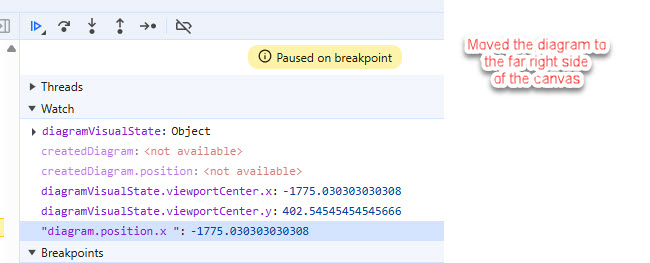
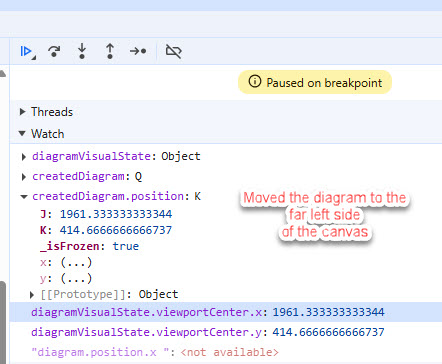
The thing is that I see after this statement that each time I am setting into the state variable, a diagram with the correct position.
See attached screenshots from the debugger.
So I really don’t understand why does goJS insists on drawing it centered.
Can you hint me what’s wrong with my approach?
BTW - everything works perfectly with those diagram expect the state of the position.
We use it for couple of years already as part of our product.