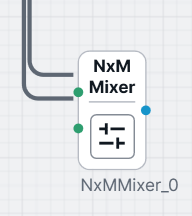
I have a node with ports connected via links to other nodes. At runtime, the number of ports on a node can increase dynamically. Existing link connections must remain intact and remain perfectly attached to their respective ports.
Calling PartManager.RebuildNodeElements() fixes the link-to-port alignment correctly, but it rebuilds all nodes and causes undesirable side effects on unrelated nodes.
I am looking for a way to refresh or rebuild only the affected node, such that links remain correctly and precisely attached to ports, without invoking a global RebuildNodeElements() call.
Calling InvalidateVisual() or InvalidateMeasure() on the node does not reattach links to ports.
You could try changing that Node’s template to something else and then back to what you want it to be. If you are using one of the node data classes that we provide, there is a “Category” property that you could set twice.
Thank you for the idea, I implemented this and it does solve the problem to an extent, but still what I see is that ports and links are not attached perfectly how they used to when I was using the RebuildNodeElements()
I tried using link.route.RecomputePoints() but doesnt help. It aligns perfectly when I slightly move the node. The links then correct and attach perfectly. Even closing , opening the tab solves the problem. Need to trigger some sort of cycle which corrects , refreshes the ui?
Instead of causing the Node to be rebuilt from its template by setting its data’s Catalog property, have you tried calling Node.InvalidateRelationships?