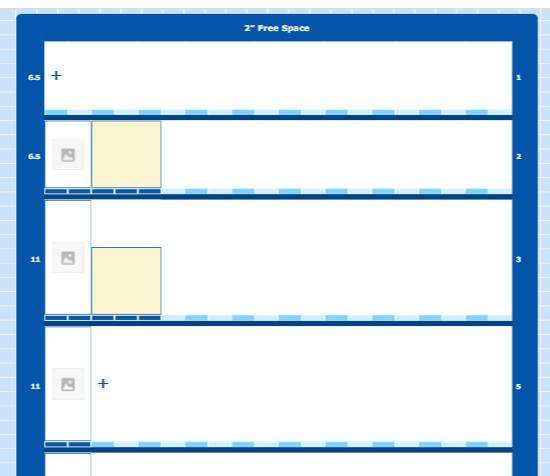
I have a palette on the left side, which lists the products. On the right side, I’m displaying the vending machine layout. On hover of the product, I want to highlight in the trays where it can fit in like below screenshot
In the above screenshot, each horizontal block is tray group and in each tray group, each color block is segment group. On dropping the product, it will be saved into segment group and the product is of type node. For example, If the dropped product occupies 3 segments, then i’m extending the width of that segment to 3 segment’s width and remove the other 2 segments.
So to achieve requirement, I’m adding an empty product node in the segment on hover by adjusting the width of segments & removing the segments. On mouse leave, i’m resetting the nodeDataArray.
But on hover, my diagram shift left side and on mouse leave, reverts back to its same position. How to avoid this diagram shifting.
I have also noticed this, shifting happens only when a new node is added to tray 1. If new node is not added to tray 1, then shifting not happening. Not sure, what is causing this issue.
On mouse enter, are you replacing the whole Model.nodeDataArray Array? It would be better to add (and on mouse leave to remove) some node data objects by calling Model.addNodeData (and Model.removeNodeData).
And since what you are doing is temporary, it would be even better not to modify the model at all, but to just call Diagram.add (and Diagram.remove) of those temporary Nodes.
If you are indeed replacing the whole model node data Array or adding individual Nodes, the layout might be causing the shift. I don’t know what your Diagram.layout is and what any Group.layouts are.
My complete diagram is one group having ‘TableLayout’. Under that tray group also having ‘Table Layout’ created for each tray. Under the tray group, segment group and then product node.
Yes, i’m using addNodeData and removeNodeData methods inside diagram.model.commit(()=>{}) block. On mouse leave, i’m resetting the whole model nodeDataArray
I want to display new node in the trays on hover of product in palette and on hover, i want to remove that node. If updating the model causes shifting, then what is the alternative for this
I still don’t know what is causing that shifting. Maybe you could implement a “ViewportBoundsChanged” DiagramEvent listener and set a breakpoint there and look at the stack at that time.