We’re trying to make programmatic model updates that should not be undoable. Even when setting diagram.skipsUndoManager = true (or model.skipsUndoManager = true) before startTransaction(), the transaction still shows up in Undo history.
Is this because the code runs inside an already open transaction?
Is there any supported way to exclude internal/server-sync updates from Undo when triggered during user interactions?
Transaction-type ChangedEvents are never recorded in Transaction.changes.
Maybe I am misunderstanding the problem. Are you getting recorded Transactions that have zero ChangedEvents in them? So is the problem that you are conducting a top-level transaction, and no ChangedEvents are being recorded (as desired), but an empty Transaction goes into the UndoManager.history?
[EDIT]
OK, I just tested your code (with an appropriate value for node) and found that after executing the code outside of an existing transaction, the code did indeed not add a Transaction to the UndoManager.history. I think this is what you want.
But if you call your code as a nested transaction within a (top-level) transaction that does notskipsUndoManager, then there is a Transaction saved. Its ChangedEvents do not include that model node data property change (as expected), but only changes caused due to the top-level transaction’s updating of the layout(s), node size(s), link route(s). Maybe that’s what is unexpected to you, but those node and link changes really do happen and they are happening within the top-level transaction that is not temporarily setting skipsUndoManager to true. So I think everything is correct, but you need to be careful not to execute that asynchronous update in a nested transaction, but as a top-level transaction. After all, transactions should only be nested due to synchronous calls to various functions, and some of those nested transactions might roll-back or commit.
Well, I’m just guessing what it is that you are doing that might be confusing.
But this internally makes a transaction with name “Layout” which gets entered into the history of undoManager.
Scenerio: when we change from readOnly to editable, similar code as above is fired which causes the diagram to be undoable at the very start after changing. This needs to be skipped. From what we understood, the “Layout” can be skipped using skipsEvent like below
'undoManager.skipsEvent': function(e) {
            // 1. Check if the event is part of a transaction we want to ignore
            const tx = this.transaction;
            if (tx) {
                const txName = tx.name;
                const ignored = ["Layout"];
                if (ignored.includes(txName)) return true; // Skip it!
            }

            // 2. Fallback to the default behavior for everything else
            return go.UndoManager.prototype.skipsEvent.call(this, e);
        },
But this will also skip undoManager if any node positions are changed which we do not want.
We did not find how to skip specific “Layout” internal events. Please suggest.
I believe the problem is that you are making changes outside of a transaction. Instead you should do something like:
diagram.commit(diag => {
  diag.layout.nodeSpacing = 45;
  // any other changes you want to make in the transition
  // between read-only and editable?
}, null);  // null means skipsUndoManager
And you should not override UndoManager.skipsEvent.
In a “LayoutCompleted” (or “InitialLayoutCompleted”) DiagramEvent, a transaction will already be ongoing, so you don’t need to start and commit one. Is that ongoing transaction the one you are complaining about being recorded? If so, it sounds like you need to wrap Diagram.skipsUndoManager around those changes. Or, do what I suggested earlier and make those changes in a separate top-level transaction that skipsUndoManager.
It’s odd to be doing so much work in a “LayoutCompleted” listener. I think it would be better to do that in a custom Layout. But I don’t think that would change the behaviors, although it depends on what you are doing in the code that I cannot see. Still, my guess is that you should execute all that code in a top-level transaction with skipsUndoManager.
As you can see in the example, we are using model.isReadOnly to modify layout. By right model changes do not trigger the custom Layout to rerun. How can we use Custom Layout in such scenerios.
I believe that any commit that internally results in a layout change triggers a internal “Layout” event which is registered by undoManager. Assume your suggested code
diagram.commit(diag => {
  diag.layout.nodeSpacing = 45;
  // any other changes you want to make in the transition
  // between read-only and editable?
}, null);  // null means skipsUndoManager
is on some button click event, it still adds a “Layout” to the undoManager history, is what I found in my quick debugging. Let me know if this is the case, if so how can we avoid this?
Below are from debugging:
The previous message code with diagram.skipsUndoManager = true; commented
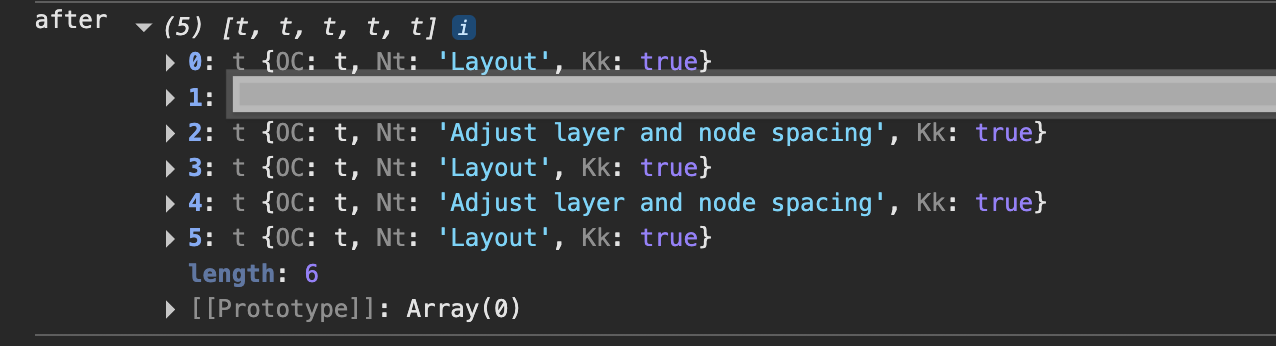
We get history as below:
As you can see the actual “Adjust layer and node spacing” are skipped because of diagram.skipsUndoManager = true; but layer entries are still registered in undoManager.
I don’t get any Transaction added to the UndoManager.history when I try what you suggest. Click the “Test” button repeatedly to see the change in the TreeLayout results and editableness of the diagram, yet the UndoManager.history does not get any longer.
Here’s my complete code:
<!DOCTYPE html>
<html>
<head>
  <title>Minimal GoJS Sample</title>
  <!-- Copyright 1998-2026 by Northwoods Software Corporation. -->
</head>
<body>
  <div id="myDiagramDiv" style="border: solid 1px black; width:100%; height:400px"></div>
  <button id="myTestButton">Test</button>
  <textarea id="mySavedModel" style="width:100%;height:250px"></textarea>

  <script src="https://cdn.jsdelivr.net/npm/gojs/release/go-debug.js"></script>
  <script id="code">
const myDiagram =
  new go.Diagram("myDiagramDiv", {
      layout: new go.TreeLayout(),
      "undoManager.isEnabled": true,
      "ModelChanged": e => {     // just for demonstration purposes,
        if (e.isTransactionFinished) {  // show the model data in the page's TextArea
          document.getElementById("mySavedModel").textContent =
            `isReadOnly: ${myDiagram.isReadOnly}\nhistory length: ${myDiagram.undoManager.history.count}\n${e.model.toJson()}`;
        }
      }
    });

myDiagram.nodeTemplate =
  new go.Node("Auto")
    .bindTwoWay("location", "loc", go.Point.parse, go.Point.stringifyFixed(1))
    .add(
      new go.Shape({ fill: "white" })
        .bind("fill", "color"),
      new go.TextBlock({ margin: 8, editable: true })
        .bindTwoWay("text")
    );

myDiagram.model = new go.GraphLinksModel(
[
  { key: 1, text: "Alpha", color: "lightblue" },
  { key: 2, text: "Beta", color: "orange" },
  { key: 3, text: "Gamma", color: "lightgreen" },
  { key: 4, text: "Delta", color: "pink" }
],
[
  { from: 1, to: 2 },
  { from: 1, to: 3 },
  { from: 3, to: 4 },
]);

var isReadOnly = false;
document.getElementById("myTestButton").addEventListener("click", e => {
  myDiagram.commit(diag => {
    isReadOnly = !isReadOnly;
    diag.isReadOnly = isReadOnly;
    diag.layout.nodeSpacing = isReadOnly ? 10 : 45;
    // any other changes you want to make in the transition
    // between read-only and editable?
  }, null);  // null means skipsUndoManager
});
  </script>
</body>
</html>
Yes, there is a nested layout that happens, but because it is nested, it doesn’t really matter – only complete top-level transactions are recorded in the history. Although those transactions might be empty, that appears not to be the case while Diagram.skipsUndoManager is true.
Oh, I forgot to address your first question about defining a custom layout class. My suggestion was merely to organize your code better, instead of putting what looks like layout code into a “LayoutCompleted” listener. I don’t think it’s relevant to this discussion.
I tried modifying the code I just posted in my previous reply. I added this “LayoutCompleted” listener: