Stretch property for elements inside of the Spot Panel

I assumed that the Stretch property stretches elements inside of the Panel.Spot in a way that they won’t exceed size of the main element or that they will fit inside of the main element. But it doesn’t seem to work this way. How can I structure my template to ensure elements are contained inside of the main shape area?

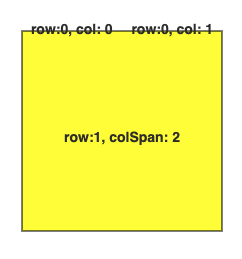
I’m currently getting this:
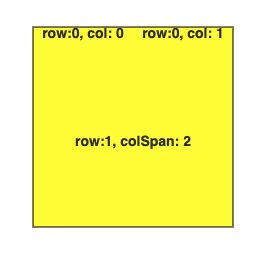
But I need this:

Example:

<!doctype html>
<html lang="en">
  <body>
    <script src="https://gojs.net/latest/release/go.js"></script>
    <div id="sample" style="display: flex">
      <div
        id="diagramDiv"
        style="border: solid 1px black; width: 600px; height: 600px"
      ></div>
    </div>

    <script id="code">
      const diagram = new go.Diagram("diagramDiv");

      const $ = go.GraphObject.make;

      const nodeTemplate = new go.Node("Spot", {
        draggable: true,
        resizable: true,
        resizeObjectName: "EditableShape",
      })
        .bindTwoWay("location", "location", go.Point.parse, go.Point.stringify)
        .add(
          new go.Panel("Spot").add(
            new go.Shape("Rectangle", {
              name: "EditableShape",
              fill: "yellow",
            }).bindTwoWay(
              "desiredSize",
              "size",
              go.Size.parse,
              go.Size.stringify,
            ),
            new go.Panel("Table", {
              stretch: go.Stretch.Fill,
            }).add(
              new go.TextBlock({
                name: "TextBlock",
                font: "bold 14px sans-serif",
                stroke: "#333",
                text: "",
                editable: true,
                row: 0,
                column: 0,
                text: "row:0, col: 0",
                textAlign: "center",
                verticalAlignment: go.Spot.Center,
              }),
              new go.TextBlock({
                name: "TextBlock",
                font: "bold 14px sans-serif",
                stroke: "#333",
                text: "",
                editable: true,
                row: 0,
                column: 1,
                text: "row:0, col: 1",
                textAlign: "center",
                verticalAlignment: go.Spot.Center,
              }),
              new go.TextBlock({
                name: "TextBlock",
                font: "bold 14px sans-serif",
                stroke: "#333",
                text: "",
                editable: true,
                row: 1,
                columnSpan: 2,
                stretch: go.Stretch.Fill,
                text: "row:1, colSpan: 2",
                textAlign: "center",
                verticalAlignment: go.Spot.Center,
              }),
            ),
          ),
        );

      diagram.nodeTemplate = nodeTemplate;

      const nodes = [
        {
          key: "N1",
          text: "Some text",
          color: "lightblue",
          location: "100 100",
          size: "200 200",
        },
      ];

      const links = [];
      diagram.model = new go.GraphLinksModel(nodes, links);
      window.diagram = diagram;
    </script>
  </body>
</html>
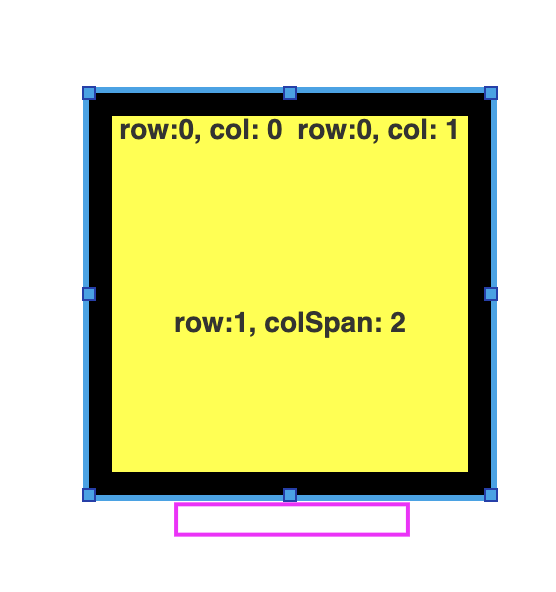
As a general guide, if you want panel elements to be inside the main element, whose size is influenced by those elements, use an “Auto” Panel. If you want elements to be arranged anywhere relative to the main element, whose size is not influence by those elements, use a “Spot” Panel.

Still, it looks like there’s a bug measuring the vertical dimension of that stretched “Table” Panel. We’ll look into it.

There’s the same issue with the Table Panel used as a cell of another Table Panel. I would expect go.Stretch.Fill to force the Table Panel to fill in the cell, but it takes more space than cell’s area and the last TextBlock is clipped:

<!doctype html>
<html lang="en">
  <body>
    <script src="https://gojs.net/latest/release/go.js"></script>
    <div id="sample" style="display: flex">
      <div
        id="diagramDiv"
        style="border: solid 1px black; width: 600px; height: 600px"
      ></div>
    </div>

    <script id="code">
      const diagram = new go.Diagram("diagramDiv");

      const $ = go.GraphObject.make;

      const nodeTemplate = new go.Node("Spot", {
        draggable: true,
        resizable: true,
        resizeObjectName: "EditableShape",
      })
        .bindTwoWay("location", "location", go.Point.parse, go.Point.stringify)
        .add(
          new go.Panel("Spot").add(
            new go.Shape("Rectangle", {
              name: "EditableShape",
              fill: "yellow",
            }).bindTwoWay(
              "desiredSize",
              "size",
              go.Size.parse,
              go.Size.stringify,
            ),
            new go.Panel("Table", {
              desiredSize: new go.Size(200, 200),
            }).add(
              new go.Shape("Rectangle", {
                row: 0,
                column: 0,
                columnSpan: 3,
                height: 10,
                stretch: go.Stretch.Horizontal,
              }),
              new go.Shape("Rectangle", {
                row: 0,
                column: 0,
                rowSpan: 3,
                width: 10,
                stretch: go.Stretch.Vertical,
              }),
              new go.Shape("Rectangle", {
                row: 2,
                column: 0,
                columnSpan: 3,
                height: 10,
                stretch: go.Stretch.Horizontal,
              }),
              new go.Shape("Rectangle", {
                row: 0,
                column: 2,
                rowSpan: 3,
                width: 10,
                stretch: go.Stretch.Vertical,
              }),
              new go.Panel("Table", {
                stretch: go.Stretch.Fill,
                row: 1,
                column: 1,
              }).add(
                new go.TextBlock({
                  name: "TextBlock",
                  font: "bold 14px sans-serif",
                  stroke: "#333",
                  text: "",
                  editable: true,
                  row: 0,
                  column: 0,
                  text: "row:0, col: 0",
                  textAlign: "center",
                  verticalAlignment: go.Spot.Center,
                }),
                new go.TextBlock({
                  name: "TextBlock",
                  font: "bold 14px sans-serif",
                  stroke: "#333",
                  text: "",
                  editable: true,
                  row: 0,
                  column: 1,
                  text: "row:0, col: 1",
                  textAlign: "center",
                  verticalAlignment: go.Spot.Center,
                }),
                new go.TextBlock({
                  name: "TextBlock",
                  font: "bold 14px sans-serif",
                  stroke: "#333",
                  text: "",
                  editable: true,
                  row: 1,
                  columnSpan: 2,
                  stretch: go.Stretch.Fill,
                  text: "row:1, colSpan: 2",
                  textAlign: "center",
                  verticalAlignment: go.Spot.Center,
                }),
                new go.TextBlock({
                  name: "TextBlock",
                  font: "bold 14px sans-serif",
                  stroke: "#333",
                  text: "",
                  editable: true,
                  row: 2,
                  columnSpan: 2,
                  text: "row:2, colSpan: 2",
                  textAlign: "center",
                  verticalAlignment: go.Spot.Center,
                }),
              ),
            ),
          ),
        );

      diagram.nodeTemplate = nodeTemplate;

      const nodes = [
        {
          key: "N1",
          text: "Some text",
          color: "lightblue",
          location: "100 100",
          size: "200 200",
        },
      ];

      const links = [];
      diagram.model = new go.GraphLinksModel(nodes, links);
      window.diagram = diagram;
    </script>
  </body>
</html>