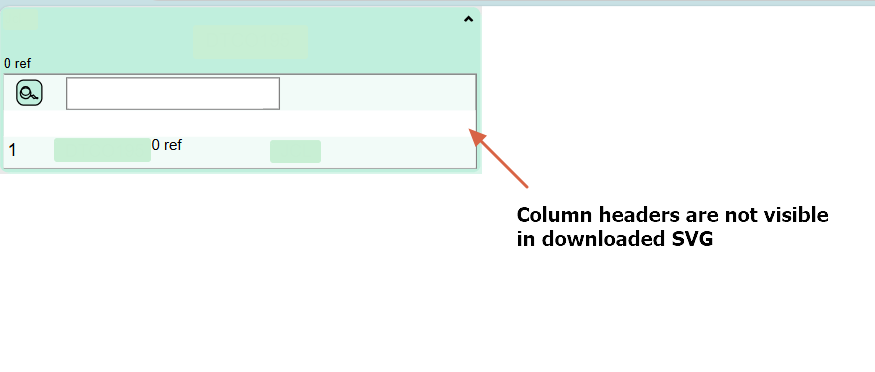
Table column headers are not visible in downloaded SVG

The column headers are not visible in downloaded SVG, please check the below attached details.

Code used to generate column headers:

$(go.Panel, “Table”,
{
stretch: go.GraphObject.Fill, //height:25,
alignment: go.Spot.Left,
margin: new go.Margin(0.5, 0, 0, 0),
},
new go.Binding(“background”, “isSelected”,
(sel, shp) => shp.part.data?.nodedetails?.tablebackgroundcolor || “white”).ofObject(),
$(go.RowColumnDefinition,
{
row: 1,
},
new go.Binding(“background”, “isSelected”,
(sel, shp) => shp.part?.data?.nodedetails?.color || “white”).ofObject(),
),
$(go.TextBlock,“”,   {     row:1,     width:49,     height: 18,     name: “IndexHeader”,     text: “Sr.No.”,     column: 0,     font: “bold 11pt sans-serif”,     alignment: go.Spot.Left,     textAlign: “left”,     wrap: go.Wrap.None,     margin: new go.Margin(2, 0, 1, 0)   },   new go.Binding(“background”, “isSelected”,     (sel, shp) =>  shp.part?.data?.nodedetails?.color || “white”).ofObject(), ), $(go.TextBlock,“”,   {   row:1,   height: 18,   name:“BLHeader”,   text:“Business Logic List”,   column: 1,   alignment: go.Spot.Left,   textAlign: “left”,   font: “bold 11pt sans-serif”,   wrap: go.Wrap.None,   margin: new go.Margin(2, 0, 1, 0) },   new go.Binding(“width”, “”, setBlColumnAndScrollingTableWidth).ofObject(),   new go.Binding(“background”, “isSelected”,     (sel, shp) =>  shp.part?.data?.nodedetails?.color || “white”).ofObject(),   ), $(go.TextBlock,“”,   {   row:1,   width:69,   height: 18,   name:“ModifiedHeader”,   text:“Modified”,   column: 3,   alignment: go.Spot.Left,   textAlign: “left”,   font: “bold 11pt sans-serif”,   wrap: go.Wrap.None,   margin: new go.Margin(2, 0, 1, 0)   },   new go.Binding(“background”, “isSelected”,     (sel, shp) => shp.part?.data?.nodedetails?.color || “white”).ofObject(), ), $(go.TextBlock,“”,   {   row:1,   height: 18,   name:“RuleTypeHeader”,   text:“RuleType”,   visible:true,   column: 2,   alignment: go.Spot.Left,   textAlign: “left”,   font: “bold 11pt sans-serif”,   wrap: go.Wrap.None,   margin: new go.Margin(2, 0, 1, 0) },   new go.Binding(“width”, “”, setRuleTypeHeaderWidth).ofObject(),   new go.Binding(“background”, “isSelected”,     (sel, shp) => shp.part?.data?.nodedetails?.color || “white”).ofObject(),   ),)

Original diagram view:
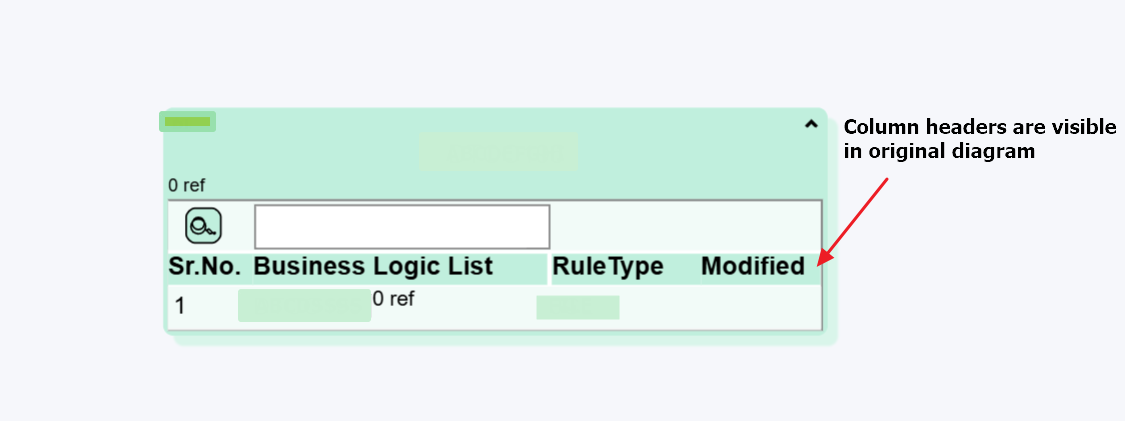
Diagram view after download SVG:
Thank you for the detail. We’ll investigate this and get back to you.

We have fixed the issue here but we need to look into a related SVG issue before we make the next release. I expect we’ll have a release by Monday.

We’ve just released 3.1.2, it should fix this issue. Thank you again for reporting.

Hi Simon,
The release version is working for me.
I have one more question regarding the scroll bar, search box of a scrolling table in SVG and license key.

 1. After upgrading the GoJS version from **3.0.11** to **3.1.2**, the previously implemented license key no longer works, and a watermark is now visible. Do I need to renew my license?

  1. Is it possible to make the scroll bar functional and use the search box to filter data inside the table in the downloaded SVG?
    If scrolling is not possible, then please provide options to automatically stretch the table to fit all the data.
  1. Whenever upgrading a major version (i.e. 2 to 3) or a minor version (i.e. 3.0 to 3.1), you’ll need to get a new license key, at: Product Activation
  2. The SVG produced by Diagram.makeSvg is meant to be a static image. A viewer of SVG cannot interact with it, for example to scroll or zoom or show context menus or copy or delete nodes or draw new links.
    However, I cannot say that it would be impossible for you to implement such behavior, but please realize that for security reasons such scripting behavior is usually restricted by various SVG renderers. I don’t know what the current state is for scripting behavior within SVG – it’s been over 20 years since I’ve implemented such behavior successfully.

Ok got it.
Were there any performance-related improvements when using Avoids Nodes in the new version?

Since 3.0.11? I don’t know – it’s possible but not obvious in reviewing the changes since then.

Hi Walter

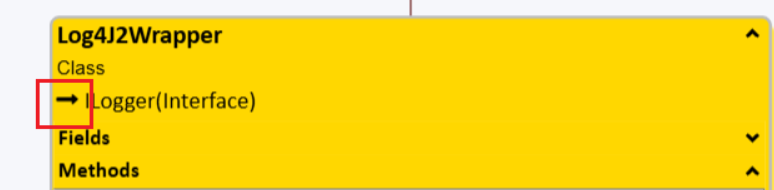
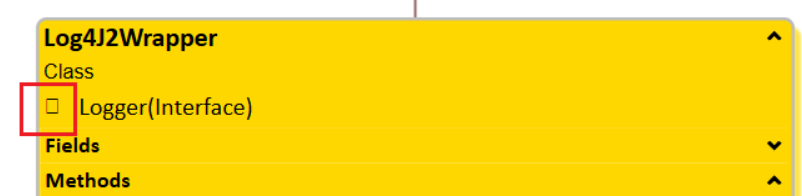
I found another issue with the SVG: the arrow icon is not visible.
Note: the text used to display the arrow icon is ‘\uf178’

Original diagram:

SVG:

Oh, that’s a Font Awesome character, isn’t it? Did you make sure the generated SVG has the desired font loaded in it?

What version are you using? It seems to work well in v3.1, both rendering as “svg” (Diagram.renderer) as well as downloading SVG (CommandHandler.downloadSvg calls Diagram.makeSvg):

<!DOCTYPE html>
<html>

<head>
  <title>Download SVG file using FontAwesome</title>
  <!-- Copyright 1998-2025 by Northwoods Software Corporation. -->
  <meta name="description" content="download an SVG file that uses the Font Awesome font">
  <meta name="viewport" content="width=device-width, initial-scale=1">
  <link rel="stylesheet" href="https://cdnjs.cloudflare.com/ajax/libs/font-awesome/4.7.0/css/font-awesome.min.css">
</head>

<body>
  <div id="myDiagramDiv" style="border: solid 1px black; width:100%; height:300px"></div>
  <button id="myDownloadButton">Download SVG file</button>
  <div>
    The model in JSON format:
    <textarea id="mySavedModel" style="width:100%;height:250px"></textarea>
  </div>

  <script src="https://cdn.jsdelivr.net/npm/gojs"></script>
  <script id="code">
    const myDiagram =
      new go.Diagram("myDiagramDiv", {
          renderer: "svg",
          "undoManager.isEnabled": true,
          "ModelChanged": e => {     // just for demonstration purposes,
            if (e.isTransactionFinished) {  // show the model data in the page's TextArea
              document.getElementById("mySavedModel").textContent = e.model.toJson();
            }
          }
        });

    myDiagram.nodeTemplate =
      new go.Node("Auto")
        .add(
          new go.Shape({ fill: "white" })
            .bind("fill", "color"),
          new go.TextBlock({ margin: 8, font: "12pt FontAwesome" })
            .bind("text")
        );

    myDiagram.model = new go.GraphLinksModel(
      [
        { key: 1, text: "\uf030", color: "lightblue" },
        { key: 2, text: "\uf02b", color: "orange" },
        { key: 3, text: "\uf0ad", color: "lightgreen" },
        { key: 4, text: "\uf013", color: "pink" },
        { key: 5, text: "\uf178", color: "yellow" }
      ]);

    document.getElementById("myDownloadButton").addEventListener("click", e => {
      myDiagram.commandHandler.downloadSvg({
        name: "fontawesomeFile.svg",
        svgFinished: svg => {
          // insert this style import into the SVG:
          // <defs>
          //   <style>@import url('https://cdnjs.cloudflare.com/ajax/libs/font-awesome/4.7.0/css/font-awesome.min.css');</style>
          // </defs>
          var defs = svg.ownerDocument.createElement("defs");
          var style = svg.ownerDocument.createElement("style");
          style.textContent = "@import url('https://cdnjs.cloudflare.com/ajax/libs/font-awesome/4.7.0/css/font-awesome.min.css');";
          defs.appendChild(style);
          svg.insertBefore(defs, svg.firstChild);
        }
      });
    });
  </script>
</body>

</html>