Hi GoJS team,
I’m experiencing a strange issue with links when combining reshaping, style switching, and Undo.
Setup
I have a diagram with:
-
Links initially configured as Bezier (
curve: go.Curve.Bezier) -
reshapable: true -
Ability to toggle links between:
-
Bezier (Normal routing)
-
Orthogonal routing
-
-
Undo/Redo enabled
Minimal setup:
<!DOCTYPE html>
<html lang="en">
<head>
  <meta charset="UTF-8">
  <meta name="viewport" content="width=device-width, initial-scale=1.0">
  <title>GoJS Curved Link Demo</title>
  <script src="https://unpkg.com/gojs/release/go.js"></script>
  <style>
    body {
      font-family: Arial, sans-serif;
      margin: 20px;
    }
    #myDiagramDiv {
      width: 800px;
      height: 500px;
      border: 1px solid #ccc;
      margin-bottom: 10px;
    }
    .controls {
      display: flex;
      gap: 10px;
    }
    button {
      padding: 10px 20px;
      font-size: 14px;
      cursor: pointer;
    }
    .info {
      margin-top: 10px;
      color: #666;
    }
  </style>
</head>
<body>
  <h1>GoJS Curved Link Demo</h1>
  <div id="myDiagramDiv"></div>
  <div class="controls">
    <button id="toggleBtn">Switch to Orthogonal</button>
    <button id="undoBtn">Undo (Ctrl+Z)</button>
    <button id="redoBtn">Redo (Ctrl+Y)</button>
  </div>
  <div class="info">
    <p>Current mode: <strong id="modeLabel">Curved</strong></p>
  </div>

  <script>
    const $ = go.GraphObject.make;
    let isCurved = true;

    const myDiagram = $(go.Diagram, "myDiagramDiv", {
      "undoManager.isEnabled": true,
      initialContentAlignment: go.Spot.Center
    });

    myDiagram.nodeTemplate = $(go.Node, "Auto",
      { locationSpot: go.Spot.Center },
      $(go.Shape, "RoundedRectangle", {
        fill: "white",
        stroke: "#707989",
        strokeWidth: 1,
        portId: "",
        fromLinkable: true,
        toLinkable: true,
        cursor: "pointer"
      }),
      $(go.TextBlock, {
        margin: 20,
        font: "16px sans-serif"
      }, new go.Binding("text", "name"))
    );

    myDiagram.linkTemplate = $(go.Link, {
        curve: go.Curve.Bezier,
        curviness: 50,
        reshapable: true,
        relinkableFrom: true,
        relinkableTo: true,
        toShortLength: 4
      },
      new go.Binding("curve", "curve"),
      new go.Binding("curviness", "curviness"),
      new go.Binding("routing", "routing"),
      $(go.Shape, {
        strokeWidth: 2,
        stroke: "#4a90d9"
      }),
      $(go.Shape, {
        toArrow: "Standard",
        stroke: "#4a90d9",
        fill: "#4a90d9"
      })
    );

    myDiagram.model = new go.GraphLinksModel(
      [
        { key: 1, name: "Node A", loc: "0 0" },
        { key: 2, name: "Node B", loc: "250 100" }
      ],
      [
        { from: 1, to: 2, curve: go.Curve.Bezier, curviness: 50, routing: go.Routing.Normal }
      ]
    );

    // Parse locations
    myDiagram.nodes.each(node => {
      const loc = node.data.loc;
      if (loc) {
        const parts = loc.split(" ");
        node.location = new go.Point(parseFloat(parts[0]), parseFloat(parts[1]));
      }
    });

    // Toggle button
    document.getElementById("toggleBtn").addEventListener("click", () => {
      myDiagram.startTransaction("toggle link style");
      myDiagram.links.each(link => {
        if (isCurved) {
          myDiagram.model.setDataProperty(link.data, "curve", go.Curve.None);
          myDiagram.model.setDataProperty(link.data, "routing", go.Routing.Orthogonal);
        } else {
          myDiagram.model.setDataProperty(link.data, "curve", go.Curve.Bezier);
          myDiagram.model.setDataProperty(link.data, "routing", go.Routing.Normal);
        }
      });
      myDiagram.commitTransaction("toggle link style");

      isCurved = !isCurved;
      document.getElementById("toggleBtn").textContent = isCurved ? "Switch to Orthogonal" : "Switch to Curved";
      document.getElementById("modeLabel").textContent = isCurved ? "Curved" : "Orthogonal";
    });

    // Undo/Redo buttons
    document.getElementById("undoBtn").addEventListener("click", () => {
      myDiagram.commandHandler.undo();
    });

    document.getElementById("redoBtn").addEventListener("click", () => {
      myDiagram.commandHandler.redo();
    });

  </script>
</body>
</html>
Steps to reproduce
-
Start with a Bezier link
-
Reshape it enough (very slight reshaping might not work) - (drag handles to significantly change its shape)
-
Switch to Orthogonal
-
Press Undo
Actual result
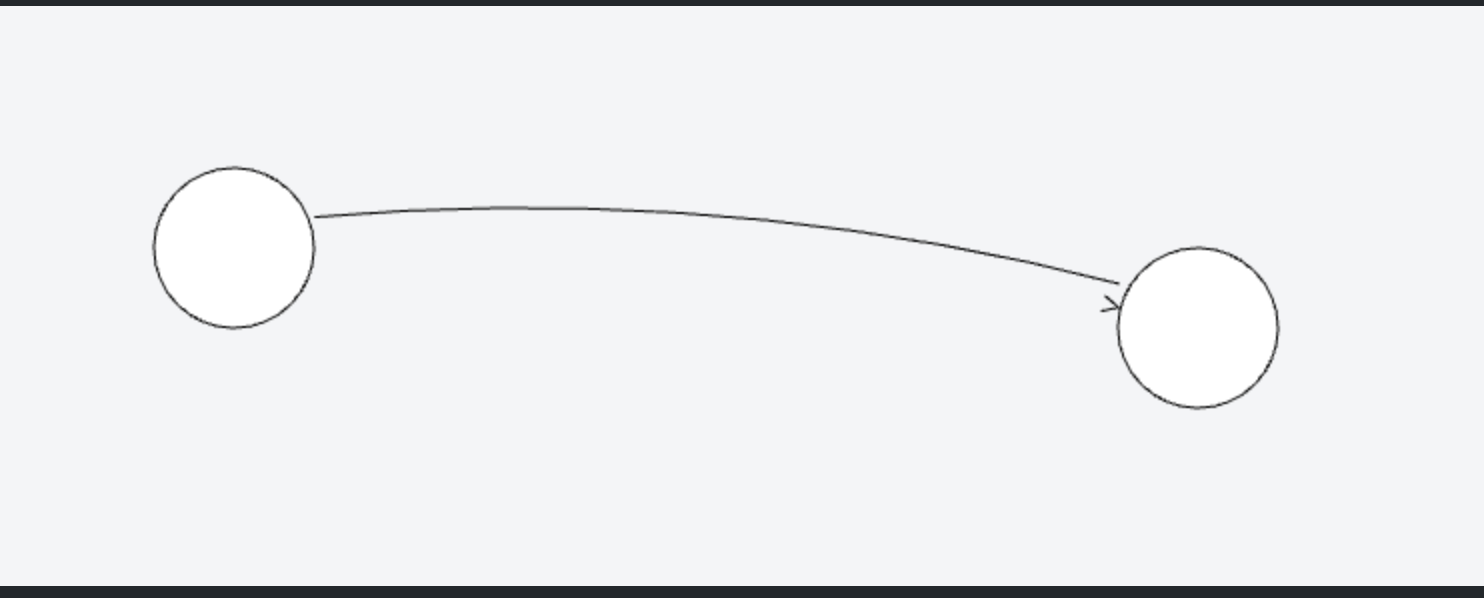
After Undo:
-
The link no longer connects properly to its start and/or end node
-
It looks detached or visually broken
-
The geometry becomes inconsistent / weird
Expected result
Undo should fully restore the previous link state, including:
-
Proper connection to nodes
-
Original Bezier shape
-
Correct geometry
Screenshot
(Attach your screenshot here — the one you shared showing the broken link)
Question
Is this:
-
A known limitation when switching between Bezier and Orthogonal after reshaping?
-
Related to how reshaping data is stored (
points) and restored? -
Something that requires manually clearing or preserving link points when switching routing/curve types?
What would be the recommended way to:
-
Safely switch between Bezier and Orthogonal links
-
While preserving Undo behavior and avoiding corrupted link geometry?
Thanks in advance for any insights!