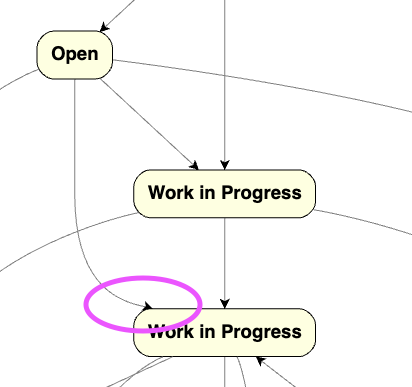
Thanks for addressing the issue I raised earlier this summer (original thread). I finally had a chance to test the fix in our product — the original problem with links not appearing as coming out of the node center seems resolved.
However, I noticed another strange-looking case now. The previous issue was that links were appearing as coming not from the center but from the bottom-middle point. Now, sometimes it’s the opposite — links appear to come to the top-edge middle point.
Also I noticed that layout options impact this behavious significantly, like having alignOption: goJs.LayeredDigraphAlign.All and layeringOption: goJs.LayeredDigraphLayering.LongestPathSource maked this issue much less noticeable.
Actually I am wondering what are the better values for layout options for graph structure like ours reprecenting process maps.
Thanks again for your help and all the improvements!
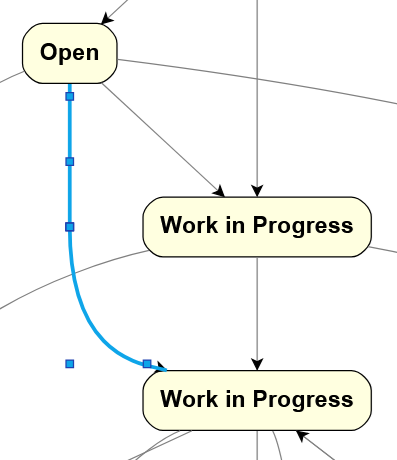
As it so happens, that arrowhead is correctly drawn given where the points are of the link’s route. Take a look at this screenshot with the Link.reshapable property set to true and the link being selected:
The last point of the route (i.e. the tip of the arrowhead) of course is at the edge of the node. Note the position of the next-to-last route point. So the last point of the route was correctly calculated to be at the intersection point of the line between the next-to-last-point and the center of the port/node.
So I suppose you could disagree with the positioning of that next-to-last point in the route. What were you preferring instead?
Well, I am not sure exactly how the link should look, just observing that currently it looks definitely weird, as if going to the top center point of the node.
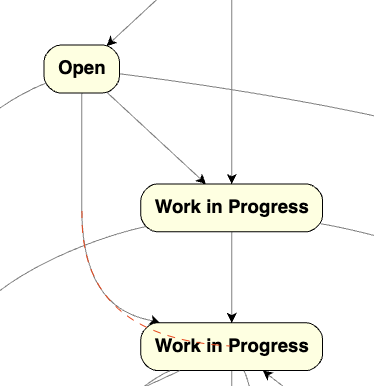
My expectation is for the link appearance is to follow a path to virtual center of the node, as in this image:
Thanks Walter, I see noticeable improvements on my codepen example, all links are aligned nicely and looking good. Looks very good so far, going to try it on our app.